

Table of content
Your remarketing lists have stopped growing and conversions are vanishing from reports? Check the plumbing first: without a properly connected Google Consent Mode v2, Google can no longer make full use of data from your European visitors and, since 31 July 2024, your Swiss visitors too.
In short
Consent Mode v2 passes the visitor's choice to Google tags, notably through ad_user_data and ad_personalization.
Google has applied its EU user consent policy to Swiss traffic since 31 July 2024.
Basic mode: nothing is sent before the choice. Advanced mode: cookieless pings and modelling.
"Enabled" does not mean working: check gcs and gcd.
What is Google Consent Mode v2?
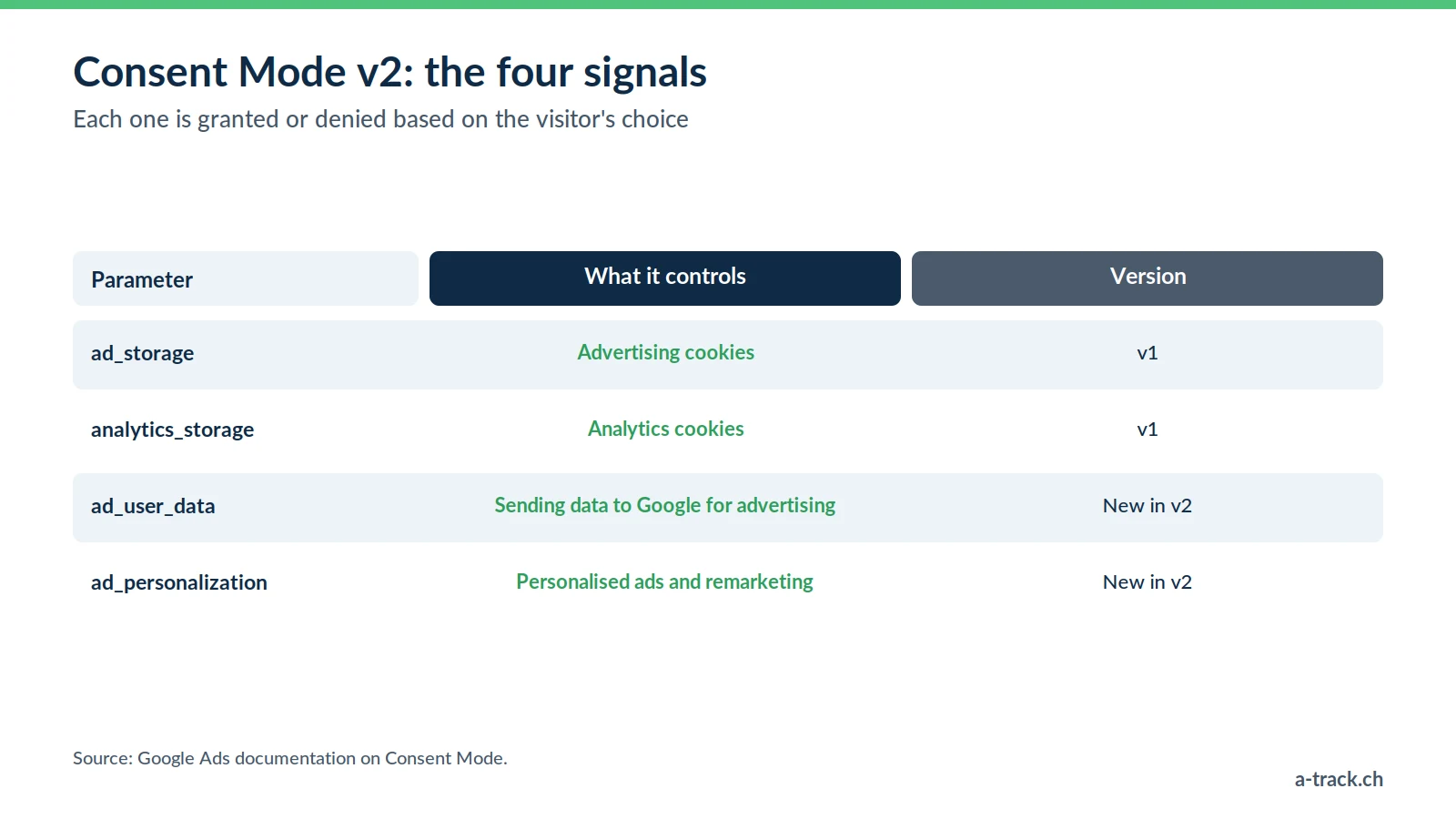
Consent Mode is not a cookie banner. It is a communication channel between your banner (CMP) and Google tags (Analytics, Ads, Floodlight): it tells them what the visitor accepted or refused.
On top of ad_storage and analytics_storage, version 2 adds:
ad_user_data: does the visitor agree to their data being sent to Google for advertising purposes?
ad_personalization: do they agree to personalised advertising, remarketing included?
Each parameter is either granted or denied. No valid signal, no ad personalisation.
Why your remarketing audiences are shrinking
According to the Google Ads documentation, to keep using measurement, personalisation and remarketing, you must collect consent and pass it on to Google. This has been required for the European Economic Area since March 2024, and for Switzerland since 31 July 2024. Without valid signals:
Remarketing stalls: your lists (site visitors, abandoned carts) stop filling up.
Conversions are under-reported: Smart Bidding optimises on an incomplete picture.
ROAS gets harder to steer: fewer signals, less precise bids.
Do not confuse the law with Google's policy. In Switzerland, Art. 45c of the Telecommunications Act only requires information and a right to refuse (opt-out); the EU requires prior consent (ePrivacy and GDPR). But for personalised advertising, Google requires consent, Swiss visitors included. Since 15 June 2026, Consent Mode is even the single control for GA4 data shared with Google Ads (Google Analytics Help). More in our FADP and GDPR compliance guide.
Basic or advanced mode: which one to choose?
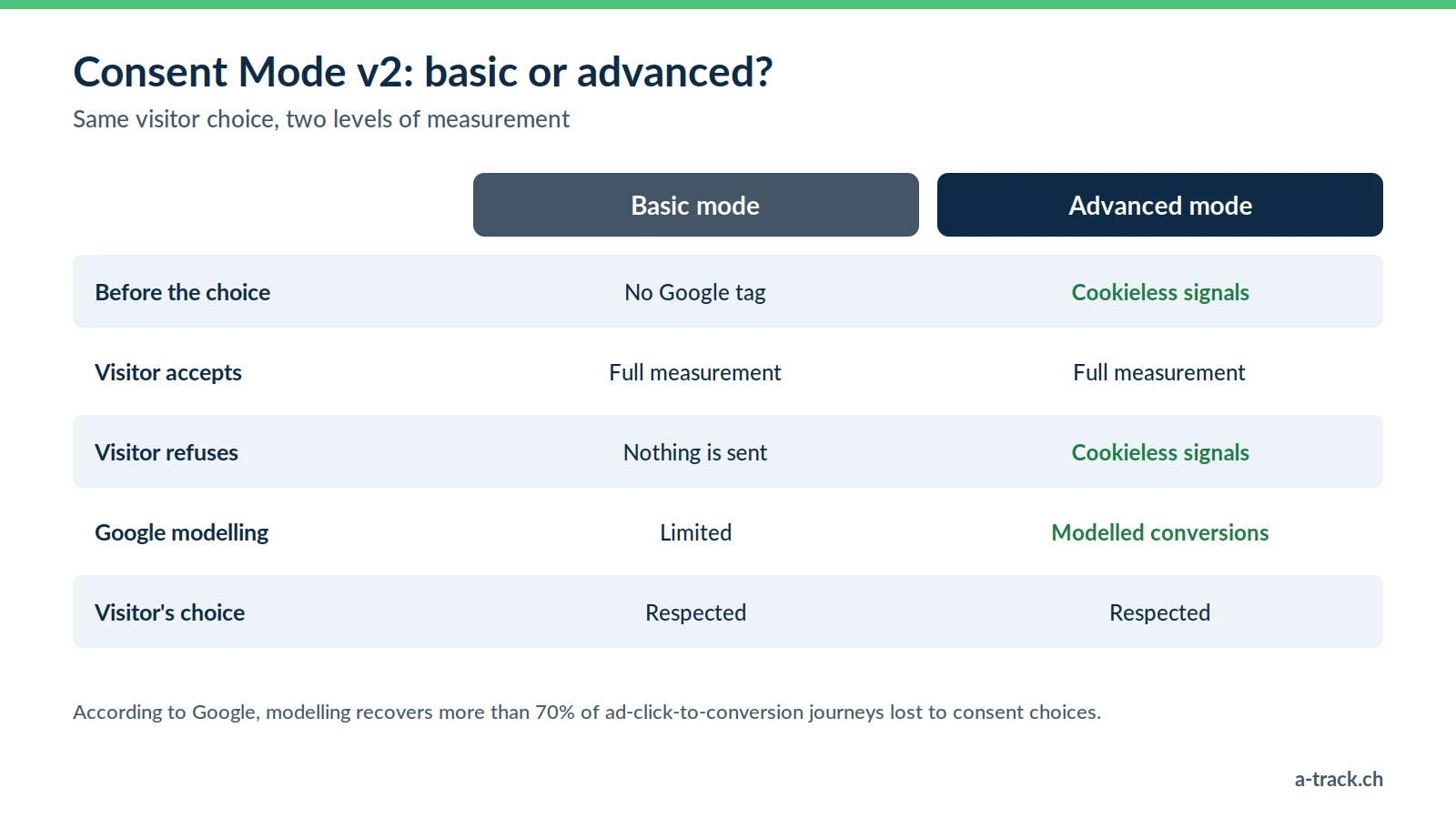
The visitor's choice is respected in both cases: only the volume of signals changes.
Basic mode: the cautious option
Google tags stay blocked until the visitor has chosen. It is the easiest option to defend in the EU. The trade-off: you know nothing about visitors who refuse or ignore the banner, and Google only applies general modelling.
Advanced mode: the performance option
Tags load with consent denied by default and send cookieless pings with no advertising identifier. Google uses them to model missing conversions: according to Google (2021), this modelling recovers on average more than 70% of ad-click-to-conversion journeys lost to cookie refusals, above a minimum data volume.
Our recommendation: advanced mode, for all our clients. It is A-Track's expertise, and setting it up costs no more than basic mode. The visitor's choice is still respected: a refusal stays a refusal.
Watch out: these pings carry technical information (timestamp, browser, IP address). In the EU, some legal commentators see this as processing that requires consent: if you target the EU, have your DPO validate the choice.
Setting it up with Google Tag Manager
Choose the CMP. Google does not require advertisers to use a partner CMP, but one from its programme follows Consent Mode updates automatically. We often use Cookie-Script, for its GTM template and SME-friendly pricing.
Configure the container. Enable the consent overview, fire the CMP's template tag on the Consent Initialization trigger and tick the Consent Mode v2 option.
Set the default values to denied for all four parameters, Switzerland included.
Gate third-party tags. Meta or LinkedIn ignore Consent Mode: fire them according to the visitor's choice through the dataLayer (see our Facebook CAPI guide).
Check that your setup actually works
A Consent Mode "enabled" in the plugin does not always stop tags from firing before the choice. Three checks:
Tag Assistant: in GTM preview, Consent tab, check the default state and its update.
Network tab: Google requests must contain the gcs and gcd parameters.
Refusal test: reject everything; no _ga or _gcl cookie should appear.
A-Track tip
Repeat this test after every update of your CMP, theme or plugins: a setup that was right at launch can break silently, taking your audiences with it.
Conclusion: three actions for this week
Check all four parameters in Tag Assistant, before and after the choice.
Switch to advanced mode and, if you target the EU, have your DPO validate the setting.
Confirm in Google Ads that your remarketing lists are filling up again.
Are your remarketing lists still filling up?
A-Track checks your four Consent Mode v2 parameters, the gcs and gcd signals and blocking before the choice, then fixes your GTM and CMP setup.
Request your free tracking and compliance audit, delivered within 48 hours.