

Table of content
Your client's Meta dashboard shows fewer sales than their Shopify or WooCommerce back office? It is not a passing glitch. Stricter browsers, ad blockers and cookie refusals rob the Pixel of part of its signals, so the algorithm optimises on an incomplete picture.
In short
The Conversions API (CAPI) sends your events from a server to Meta, alongside the Pixel.
Meta recommends running both, with a shared event_id to avoid duplicates.
Event Match Quality, a score out of 10, rates the quality of your matching data.
CAPI makes measurement more robust, but a refusal is still a refusal.
What is Meta's Conversions API?
The Conversions API (CAPI) sends events (purchase, add to cart, view content) from a server to Meta. According to Meta's documentation, it connects an advertiser's marketing data to the systems that optimise targeting and measure results.
Pixel (browser): the fbevents.js script fires from the page. It depends on the browser, extensions and visitor settings.
CAPI (server): your server, or a server-side GTM container on your own subdomain, passes the event on. It no longer relies on a third-party script running on the visitor's device.
Why the Pixel alone is no longer enough
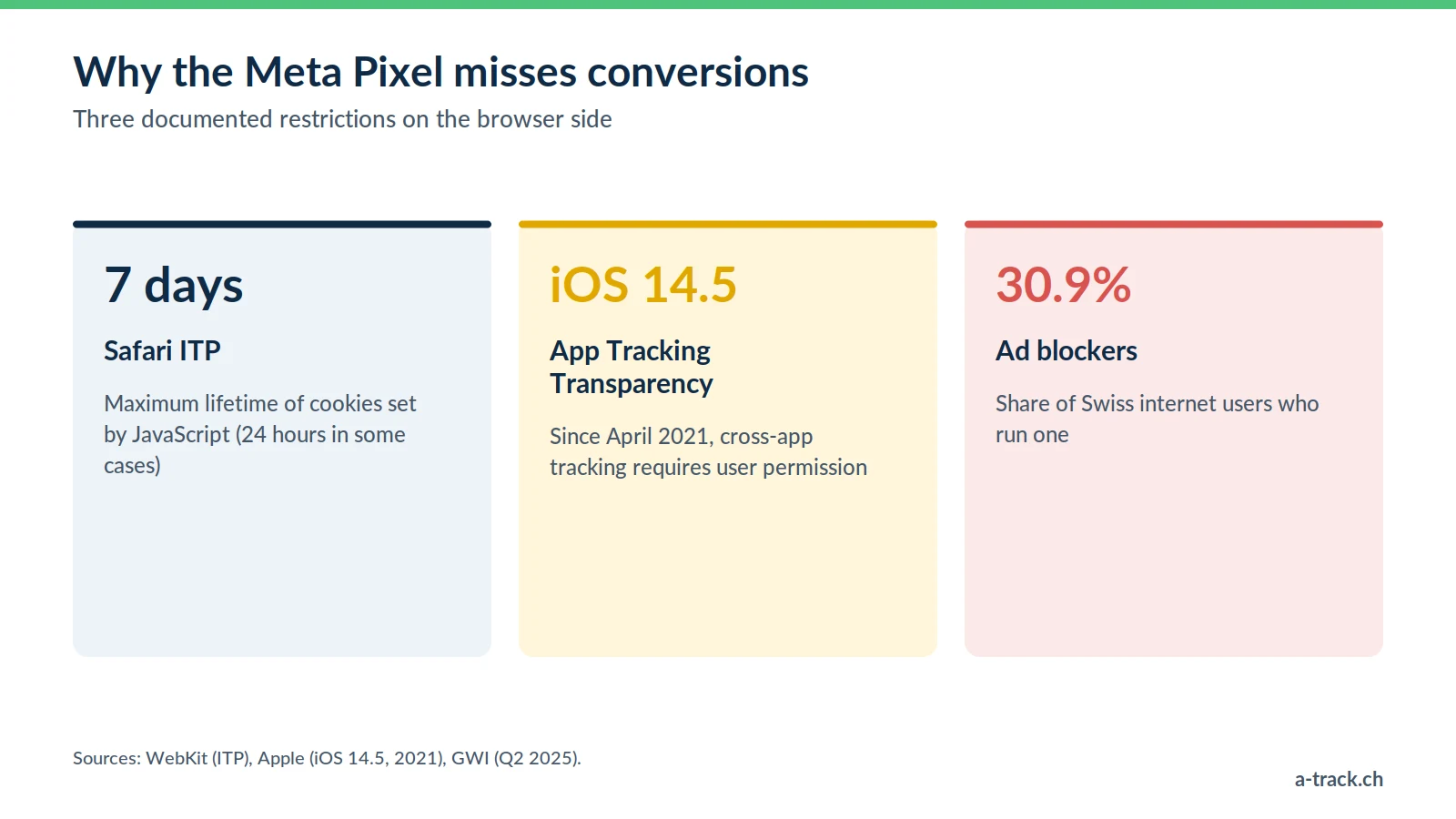
Browsers. With ITP, Safari caps cookies set by JavaScript at 7 days (24 hours in some link-tracking cases). Since iOS 14.5 (April 2021), App Tracking Transparency makes cross-app tracking subject to user permission. Safari 17 also strips known tracking parameters from links in Private Browsing (WebKit, 2023).
Ad blockers. According to GWI (Q2 2025), 30.9% of Swiss internet users run an ad blocker. Many block the Pixel, so those conversions never reach Events Manager.
Script weight. Every pixel adds load to the page. A server-side container bundles the calls and cuts down on third-party scripts.
Third-party cookies, for their part, remain in Chrome: Google dropped its plan to remove them in April 2025. It is the build-up of these restrictions that hurts the Pixel, which leads to signal loss. The big picture is in our marketing performance measurement guide.
Event Match Quality: the metric to watch
In Events Manager, Meta scores your events out of 10: this is Event Match Quality (EMQ). It shows whether the information you send lets Meta match the event to a Meta account. What pushes it up:
Technical identifiers, sent unhashed: IP address, user agent, _fbp and _fbc cookies.
Customer data hashed with SHA-256: email, phone, name, postcode (Meta customer information parameters).
Advanced Matching: the hashed email of a logged-in customer, which also helps link mobile and desktop journeys.
The better Meta recognises buyers, the better it attributes and optimises. But hashing is not encryption: a hashed email is still pseudonymised personal data under the FADP and the GDPR.
Implementing CAPI the right way
Ticking "enable API" in a plugin is a start, not a guarantee.
1. Pixel and CAPI together, with deduplication
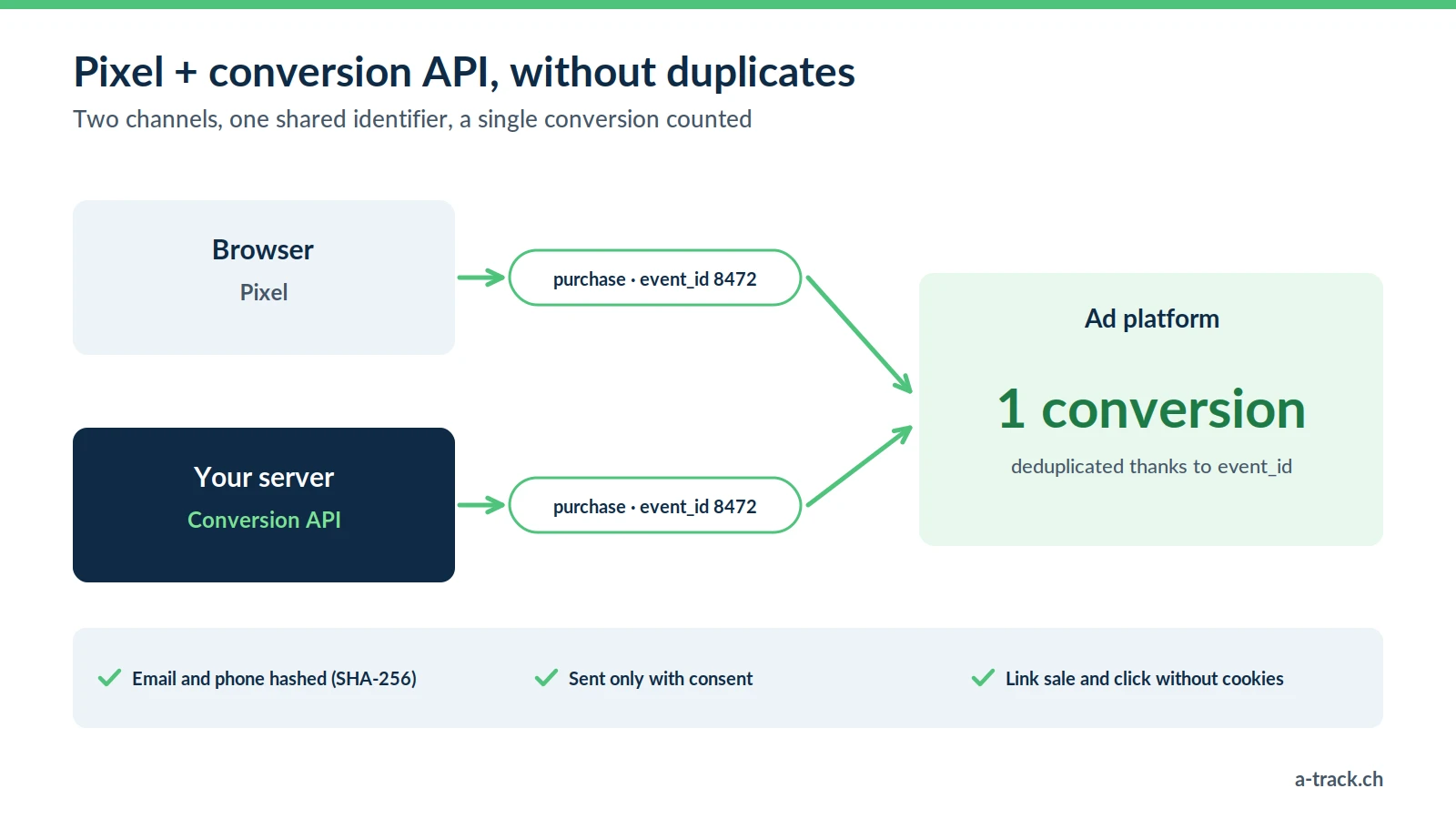
Meta recommends the Conversions API alongside the Pixel (Meta on deduplication). Without a shared identifier, a purchase received twice counts twice. The fix: the same event_id and event name on both sides, generated through the dataLayer and Google Tag Manager. Meta then keeps a single event, provided both arrive within 48 hours (deduplication).
2. A server on your own subdomain
We deploy a server-side GTM container hosted with Stape, on the client's subdomain (data.your-shop.ch), with a server in Europe. This is first-party measurement, more resilient to technical restrictions, and it lets you decide which data goes to Meta. A European proxy does not make the flow compliant on its own, though: Meta is still a recipient. Details in our Meta CAPI server-side article.
Consent: what CAPI does not change
A server-side call is still processing of personal data. CAPI is not a way around a refusal.
EU visitors: prior consent is required (ePrivacy and GDPR).
Swiss visitors: Art. 45c of the Telecommunications Act requires information and a right to refuse; the FADP requires transparency and proportionality. Name Meta in your privacy policy.
In the server container: only send the event after consent, with the parameters you actually need.
A-Track tip
Reject everything in the banner, place a test order and follow it in the server container preview: no event should reach Meta.
How to pitch CAPI to your clients
Your clients do not speak "event_id" or "JSON". Talk about reliability:
"Part of your sales never reaches Meta because of browsers and ad blockers, so the algorithm is optimising half blind. With the Conversions API on your own subdomain, it receives more complete conversions, while respecting your visitors' choices. We will track the gap between your shop and Meta, plus the EMQ score, to measure the gain."
Promise more reliable, verifiable measurement, not a cost per purchase cut by a figure set in advance. The full legal framework is in our FADP and GDPR compliance guide.
Conclusion: three actions for this week
Compare back-office purchases with those in Events Manager over 30 days.
Check the event_id and EMQ score of your purchase events.
Run the refusal test and fix any event that fires without consent.
Is Meta seeing every sale your shop makes?
A-Track deploys the Conversions API on your own subdomain, with an event_id shared with the Pixel, and checks Event Match Quality and that refusals are respected.
Start with a free tracking and compliance audit, delivered within 48 hours.