

Table of content
Your campaigns seem to underperform, yet direct traffic converts surprisingly well? If your payment, booking or sign-up happens on a provider's domain, that is often the reason: the visitor changes domain, their measurement identifier does not follow, and the sale is credited to the wrong channel.
In short
A cookie only exists for the domain that set it: two separate domains mean two separate visitors, unless the identifier is carried across.
GA4 cross-domain measurement (the _gl parameter) and the Conversion Linker are the foundation, but they fail without a link click: redirects, POST, iframes, JavaScript buttons.
Server-side does not move a cookie between domains. It extends the lifetime of identifiers on each of your domains in the face of Safari's limits.
Linking a visitor across domains has consequences under the FADP and GDPR: deal with them before going live.
This article is for Swiss SMEs, web agencies and marketing agencies whose conversion funnel crosses several domains. That applies to many sites in French- and German-speaking Switzerland: hotels, training providers, ticketing, associations, medical practices, and shops that outsource payment.
Why does a two-domain journey break measurement?
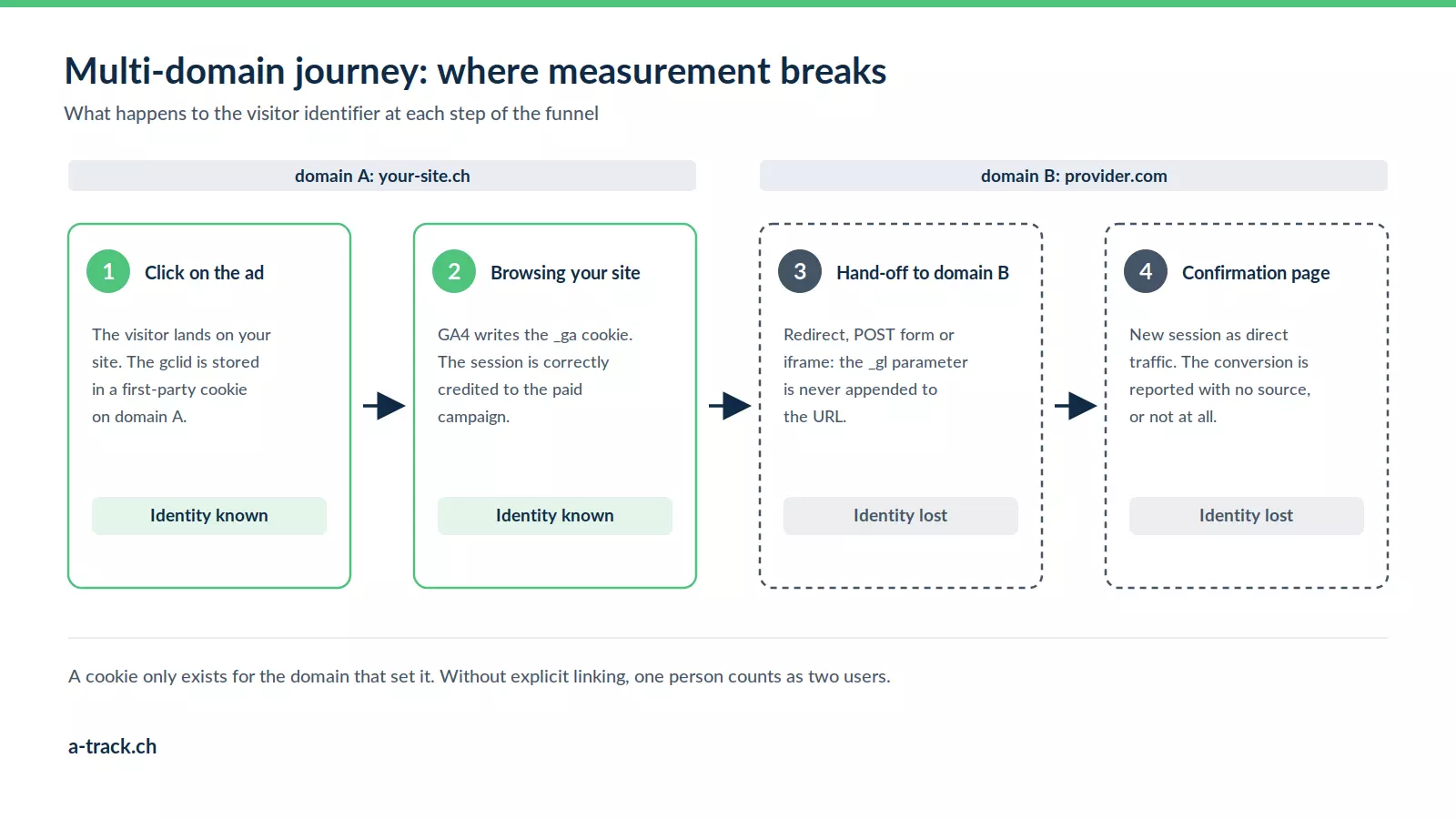
The mechanism is simple, which is exactly why it goes unnoticed for months.
A cookie belongs to one domain, and one only
When GA4 runs on your-hotel.ch, it writes a _ga cookie holding a client ID, tied to your-hotel.ch. When the visitor clicks "Book" and lands on booking-provider.com, the browser applies a basic web rule: one site cannot read another site's cookies. The measurement script on the destination domain finds no cookie, creates a new one and gives the visitor a new identity.
You broke nothing and misconfigured nothing: the browser is doing exactly what it is meant to do.
What GA4 then shows
The consequence shows up in your acquisition reports. The first session ends on your site with no conversion. A second session starts on the provider's domain. Because the referrer is your own site, or gets lost in a redirect, that second session is classed as direct traffic, or even as a referral from your own domain.
User counts are inflated by design: one person, two users. The paid channel's conversion rate collapses while direct soars. If your direct traffic converts far better than your campaigns, this is often part of the explanation.
What Google Ads, Meta and LinkedIn see
On the advertising side the problem is worse, because it hits bid optimisation. A click on a Google Ads ad adds a click identifier (gclid, or wbraid and gbraid on some iOS journeys) to the landing page URL. That identifier must be stored on that domain and read back when the conversion happens.
If the conversion happens on a domain that never saw the identifier, it is reported without a source, or not at all. Smart bidding then learns from truncated data and shifts your budget towards the wrong audiences.
Which journeys are affected, and what really needs fixing?
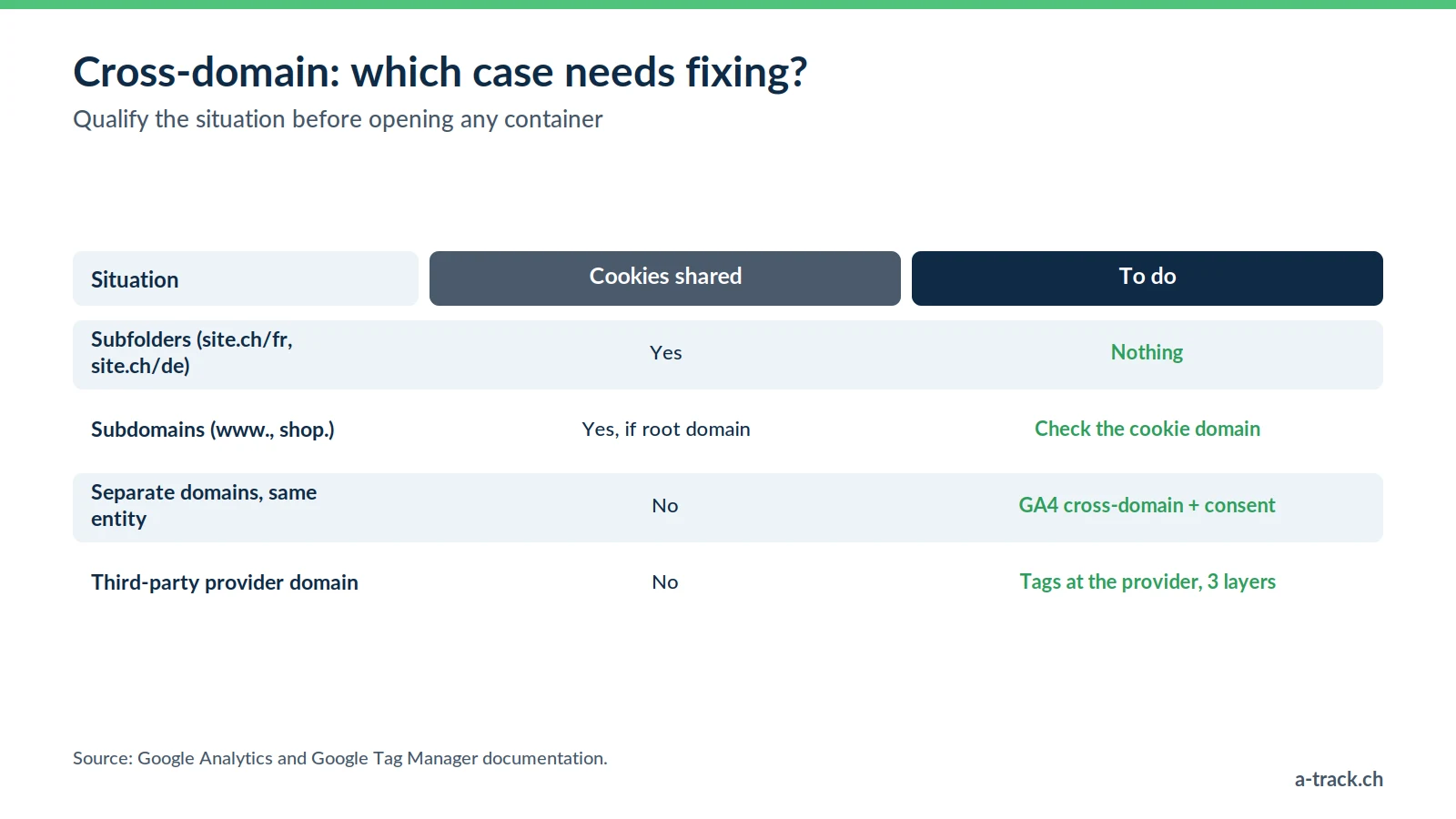
The question is not "do I have several domains?" but "does my conversion funnel leave my domain before completion?". The most common cases in Switzerland:
Hotels and accommodation: brochure site on a .ch domain, booking engine hosted on the provider's domain.
Ticketing, events and leisure: the site presents the offer, the ticketing platform takes the payment.
E-commerce with a hosted payment page: basket on your domain, card entry at the payment provider, return to your confirmation page.
Training and private schools: institutional site on one side, enrolment portal or LMS on the other.
Practices and clinics: appointment booking handled by an external platform.
Multi-brand or multilingual groups: a .ch domain and a .fr or .de domain, with visitors moving between them.
B2B and recruitment: corporate site plus an application portal or client area on a separate domain.
Note that a round trip counts twice. In a payment journey, the visitor leaves your domain and comes back. Every crossing is a chance to lose the identity, and the confirmation page is precisely the one that fires your purchase event.
Subdomain or separate domain?
Before opening any container, qualify the situation. Not every case calls for the same work, and many teams fix a problem they do not have.
Same domain, subfolders (your-site.ch/fr/ and your-site.ch/de/): nothing to do, cookies are shared.
Subdomains of the same domain (www.your-site.ch and shop.your-site.ch): no cross-domain setup needed, as long as the cookie is set on the root domain. That is the default behaviour of the Google tag and the Conversion Linker. Cross-domain settings wrongly applied to subdomains can even create problems.
Different domains, same entity (your-site.ch and your-site.fr): cross-domain setup needed, consent to think through.
A third-party provider's domain (payment, booking, ticketing): the hardest case, because you control neither the code nor the cookie policy of the destination domain. Solutions depend on what the provider agrees to deploy.
This qualification drives most of the workload. In an audit it is the first question we ask, before even opening Google Tag Manager; it is part of our 15-point tracking audit checklist.
The _gl parameter and the Conversion Linker: why native linking is not enough
GA4 cross-domain measurement
GA4 handles cross-domain measurement in the interface: Admin, Data streams, Configure tag settings, Configure your domains. According to Google's official documentation, you can create up to 100 conditions there.
How it works: when a visitor moves to a declared domain, the tag appends a _gl parameter to the URL carrying the GA4 client ID and Google click identifiers. The destination domain reads the parameter and recreates the matching cookies. The session continues and the user stays the same.
Three conditions must be met: all domains use the same "G-" measurement ID, the Google tag is on every page of every domain, and the move happens through a link click or form submission the tag can decorate.
The Conversion Linker, the tag people forget
The Conversion Linker is a Google Tag Manager tag separate from GA4. According to the Google Tag Manager documentation, it detects ad click information in the landing page URL and stores it in first-party cookies and browser local storage (or in the URL for AMP pages). By default it uses the highest-level domain possible.
Without this tag on the domain where the conversion happens, the gclid carried over from your site is never stored. It is the most common oversight we find on multi-domain journeys, including at advertisers who invest heavily in Google Ads.
Six situations where link decoration fails
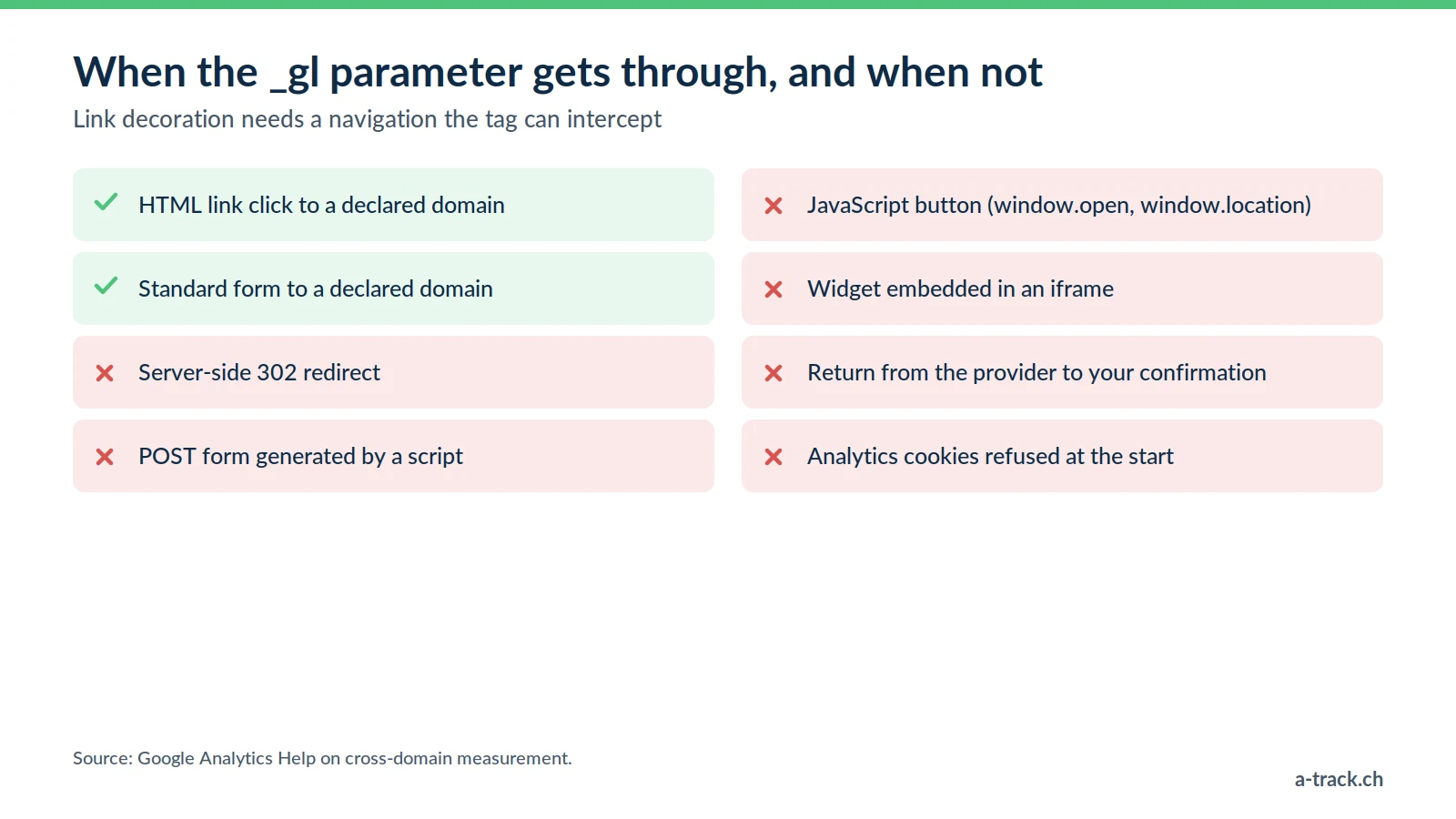
The _gl parameter is only added if the tag can intercept the navigation. In the following cases it is not passed on, and the journey breaks silently:
Server-side redirect: your site returns a 302 redirect to the provider. No link click, no decoration.
Dynamically generated POST form: common in payment funnels, where the form is built or submitted by a script.
JavaScript button: a button calling window.open or changing window.location after an asynchronous step can fire before decoration is applied.
Iframe: a booking widget embedded in an iframe is a page on another domain, where the parameter does not travel via a click.
Return from the provider: the third-party domain sends the visitor back to your confirmation page without decorating anything. They return as a stranger if their original cookie has expired or been deleted.
Consent not given at the time of the click: if analytics cookies are refused on the starting domain, there is no identifier to carry, and that is how it should be.
These six cases explain why a setup "done in the GA4 interface" looks in place while nothing gets through: the setting is right, the real journey is not.
What does server-side tracking really change?
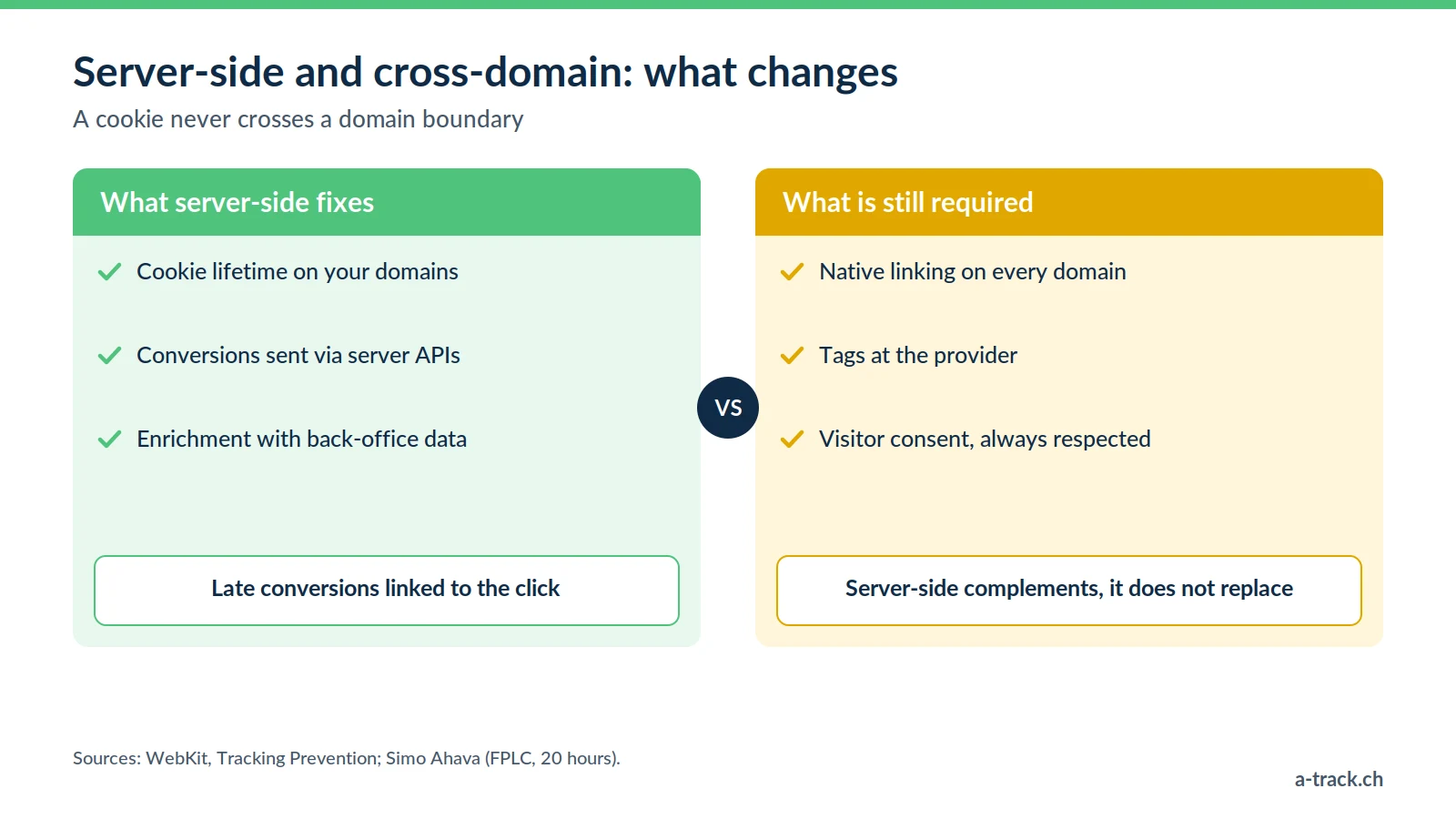
Let's be precise, because this topic is often oversold. Server-side tracking does not let a cookie cross a domain boundary. A tagging server hosted on data.your-site.ch can set a cookie for your-site.ch, not for a provider's domain. No architecture gets around this browser rule.
What server-side solves: cookie lifetime
The real gain lies elsewhere, and it matters on journeys that stretch over time, such as a booking or a B2B quote.
Since February 2019, Safari has capped persistent cookies created in JavaScript at 7 days, as Apple announced with Intelligent Tracking Prevention 2.1. The cap drops to 24 hours when the visitor arrives from a domain classified as a tracker with a decorated URL (query parameters or fragment), according to WebKit's tracking prevention documentation.
This is counter-intuitive: link decoration adds parameters to the URL. On a journey passing through a classified domain, the very mechanism meant to save attribution can shorten the life of the recreated cookie.
A cookie set by the server in the HTTP response, from a subdomain you genuinely own, escapes the cap on JavaScript cookies. That is the core gain of server-side. With one important limit: the same WebKit documentation states that ITP detects third-party CNAME cloaking and IP address cloaking (a subdomain pointing, via CNAME or IP address, to a third party's infrastructure) and then also caps those cookies at 7 days. Check with your sGTM host how your collection subdomain is connected.
FPID, FPLC and the twenty-hour limit
Google built a dedicated mechanism for server-side. The server container can set an FPID cookie as HttpOnly, inaccessible to JavaScript and therefore more robust. The downside: a cookie JavaScript cannot read cannot be used to decorate a link.
Google therefore introduced a second cookie, FPLC, derived from the FPID and readable by JavaScript, which acts as a cross-domain linking token. As documented by Simo Ahava, this token lives for 20 hours, and the server containers on both domains must belong to the same Google Tag Manager account.
In practice, server-side cross-domain linking works for a continuous journey, not for a visitor who comes back three days later to complete a booking.
What server-side fixes, and what it does not
Fixes: the lifetime of identifiers on each of your domains, and therefore the ability to link a late conversion to the original click.
Fixes: sending conversions to platforms via server APIs (Google Ads, Meta, LinkedIn, TikTok), including when technical browser restrictions block the calls.
Fixes: enriching conversions with back-office data, which partly offsets the identity lost between domains.
Does not fix: sharing a cookie between two separate domains. That remains impossible.
Does not fix: a missing tag on the provider's domain. If you deploy nothing there, you measure nothing there.
Does not fix: a consent refusal. Server-side respects the visitor's choice: a refusal stays a refusal.
The three linking layers, in order
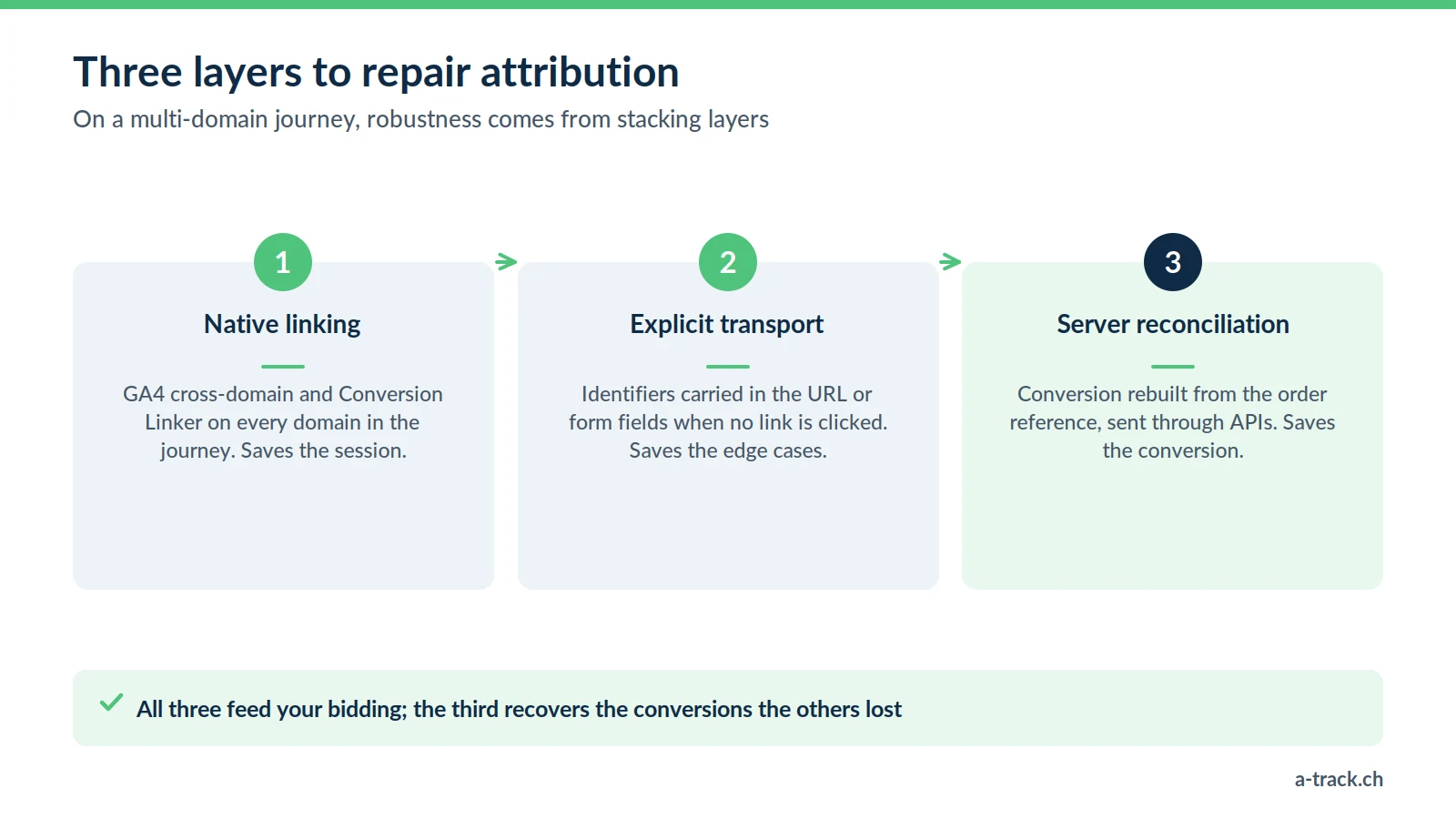
On a multi-domain journey, robustness comes from stacking three layers, not from picking one.
Layer 1, native linking: GA4 cross-domain configuration and the Conversion Linker deployed on every domain in the journey, including the provider's. This is the foundation, and it costs nothing in licences.
Layer 2, explicit transport: where layer 1 cannot apply (redirect, POST, iframe), you carry the useful identifiers yourself in the URL or form fields, then read them back on arrival. These parameters are personal data: purpose, information and retention period must be defined.
Layer 3, server reconciliation: the conversion is rebuilt server-side from the order or booking reference, then sent to the platforms through their APIs. This layer catches what the first two missed, and it holds up best as browsers evolve.
Key takeaway: layers 1 and 2 save the session, layer 3 saves the conversion. All three feed your bidding, but the third is the one that recovers conversions the others lost.
A-Track tip
When the destination domain belongs to a provider, do not just ask them to "install tracking". Send a precise request: same GA4 ID, Conversion Linker, domains to declare, and a return to your confirmation page with the order reference. It shortens the back-and-forth considerably.
Consent, FADP and GDPR: what to check
Linking a visitor across two domains means, by definition, building a profile that goes beyond a single site. The legal stakes shift.
First, transparency. The Federal Act on Data Protection requires transparency and proportionality. An identifier shared across domains must be described in the privacy policy of each domain concerned, naming the controller. For cookies, Swiss law (Art. 45c of the Telecommunications Act) requires information and a right to refuse; for EU visitors, prior consent applies (ePrivacy and GDPR).
Second, the scope of consent. As a rule, a banner on your-site.ch does not cover provider-domain.com, unless the two entities have an explicit contractual arrangement. Visitors often see two banners in a row and may answer differently on each. Your implementation has to handle that: if analytics is refused on the second domain, no identifier should be recreated there. Google itself notes that Analytics needs consent to link visitors across domains via the _gl parameter.
Third, a useful regulatory signal. France's CNIL considers that an audience measurement tracker loses its consent exemption as soon as it enables global tracking of browsing across different sites, notably through a shared identifier. In other words, the mechanism that repairs attribution is also the one that makes consent mandatory on the EU side. This reasoning does not carry over directly to Swiss law, but it concerns every Swiss business targeting the European Union.
Finally, Consent Mode must be consistent across all domains. Different default values from one domain to the next produce modelling gaps nobody can explain. See our Google Consent Mode v2 guide and, for the full framework, our FADP and GDPR compliance guide.
Conclusion: diagnose your journey in thirty minutes
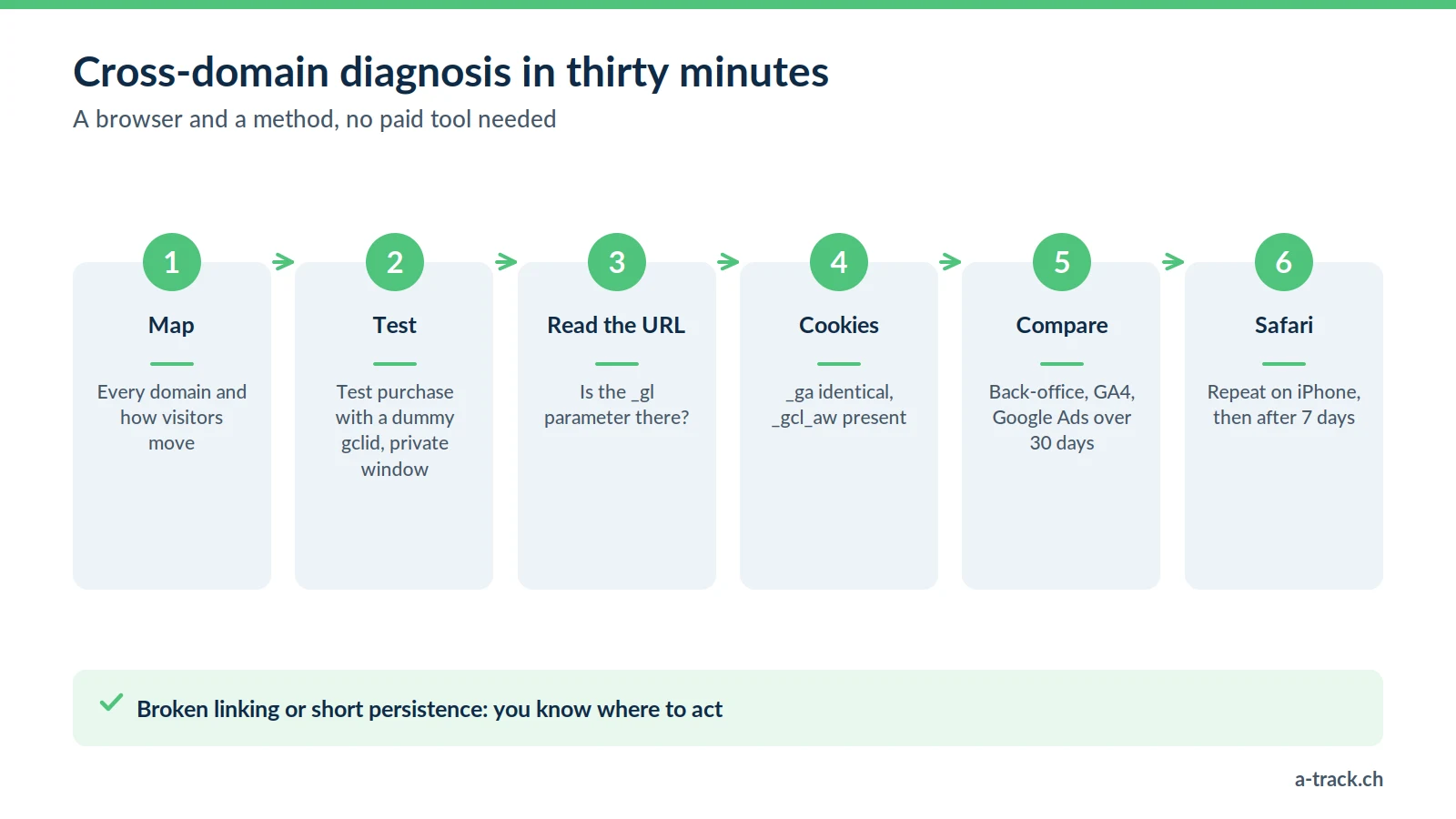
This diagnosis needs no paid tool: a browser and a method.
Map the real journey. List every domain crossed between the entry page and the confirmation, in order, and how the visitor moves at each step: link, redirect, form, iframe.
Make a test purchase or booking from an ad, or from a URL with a dummy gclid parameter, in a private window.
Check the URL at every domain change. Is the _gl parameter there? If not, layer 1 fails at that step.
Inspect cookies on the destination domain. Is the _ga value identical to the starting domain's? Is there a _gcl_aw cookie?
Check the confirmation page. Does the conversion event fire there, and with which client ID?
Compare three numbers over thirty days: back-office orders, GA4 conversions, Google Ads conversions. A large, persistent gap on a multi-domain journey rarely has another cause.
Repeat the test in Safari on an iPhone, then again seven days later. This is the test that reveals cookie lifetime issues, invisible in Chrome in a single session.
If steps 3 and 4 fail, you have a linking problem. If they pass but step 6 shows a gap, look at persistence or consent. In most cases we see, the problem is not in Google Tag Manager: it sits in a funnel step nobody had identified as a domain change.
How A-Track can help
We work on these journeys for Swiss SMEs and for agencies that prefer to delegate measurement: an audit to establish where conversions are lost, implementation of the three layers, then a cross-check between your back-office and your platforms. Our tracking and compliance services cover implementation, and our annual maintenance makes sure the journey does not break at the next checkout redesign (see also why server-side tracking breaks after launch).
Sources
Google Analytics, set up cross-domain measurement, official documentation.
Google Tag Manager, Conversion Linker tag, official documentation.
WebKit, Intelligent Tracking Prevention 2.1, Apple, 21 February 2019; WebKit, Tracking Prevention.
Simo Ahava, Cross-domain Tracking With Server-side FPID Cookie.
Luc Nugteren, Multi-domain tracking: 5 best practices, Stape, 16 September 2026.
Is your external checkout breaking your attribution?
A-Track follows your journey end to end, from your site to the payment or booking provider, checks _gl, Conversion Linker and consent, then fixes the attribution breaks.
Let's review it in a 30-minute call with an expert.