

Table of content
Server-side tracking does not stay reliable on its own. A website release, a cookie banner change or an update on the ad platform side is enough to cut off part of your conversions, usually without any error message. The fix is a three-layer monitoring routine: automated alerts on event volumes, a weekly review of server logs, and a full audit every six to eight weeks.
This article is written for Swiss SMEs, web agencies and marketing agencies that have already invested in a server-side Google Tag Manager container (sGTM) and want that investment to deliver accurate data over time, not just on launch day.
Key takeaways
Your sGTM hosting provider monitors its infrastructure, not your configuration: if your website stops sending events, the server stays "healthy" and tells you nothing.
Most failures start on your own website: a release, a theme change, a rebuilt checkout, a CMP update.
A simple alert on a minimum number of events per hour catches most complete outages within the hour.
Log reviews should be weekly, because log retention is short (a few days, depending on the plan).
Monitoring is also a compliance matter: a tag that fires before consent after an update contradicts what your privacy notice says, and Art. 7 FADP requires data protection by design and by default.
Why does server-side tracking that used to work break without warning?
Server-side tracking moves data collection onto a server you control. That is a major step forward, as we explained in our article on owning your data in Switzerland. But the server only receives what the browser sends it. As long as your website, your CMP and your web tags keep changing, the chain can break upstream of the server.
In a post published on 2 September 2026, the Stape team put it bluntly: server-side tracking "doesn't stay fixed". We see the same root causes again and again in our audits across French- and German-speaking Switzerland.
Website releases
This is the number one cause. A developer ships a new version of the site and unintentionally changes something the tracking relies on:
the GTM snippet is dropped from a page template, for example the order confirmation page;
the setting that routes GA4 requests to your first-party collection subdomain is removed from the Google tag;
a CSS class or button ID is renamed while a GTM trigger depended on it;
the checkout is rebuilt and the dataLayer no longer pushes the purchase event, or pushes it without a value.
In the last three cases, tracking does not stop entirely. It loses a piece. Page views keep flowing, dashboards look normal, and only conversions vanish. This is the most expensive kind of outage, because Smart Bidding and Meta's algorithms keep optimising against a signal that has become wrong.
The CMP and consent
A cookie banner is a living component: vendor updates, new wording, new categories, a switch to another provider. Every change can disturb two critical mechanisms.
The first is execution order. Google's Consent Mode documentation is explicit: if your consent code is called out of order, consent defaults will not work. The default state has to be set before Google tags load, then updated with the update command as soon as the user makes a choice.
The second is the update event. Not every CMP pushes a separate event to the dataLayer when a user changes their preferences. On 9 September 2026, Stape published a guide on exactly this issue: Google tags that support Consent Mode adapt on their own, but third-party tags (LinkedIn, TikTok, Microsoft Ads, CRM tools) cannot react if no event tells them consent has changed. The outcome is lost conversions or, worse, tags firing at the wrong moment.
If your Consent Mode setup still feels unclear, start with our Google Consent Mode v2 guide.
Platform and browser changes
Meta, Google, LinkedIn and Apple regularly change their APIs, their parameter requirements and browser behaviour. Your configuration has not moved, yet what it produces has. A tag template version that is no longer maintained, a parameter that has become mandatory, a modified identifier format: these changes rarely trigger a visible error. You simply see a lower match rate or fewer attributed conversions.
Configuration drift
Finally, there is wear and tear. Over the months, several people work in the container: the paid media agency adds a tag, an intern duplicates a trigger, a contractor tests an integration and forgets to remove it. Without documentation and regular reviews, the container becomes hard to read, and every incident takes longer to diagnose.
Managed infrastructure versus monitored measurement: what is the difference?
This is the most common misunderstanding we hear from clients. Many assume that managed hosting (Stape, another provider, or a properly configured Google Cloud Run setup) also covers data quality. It does not. Here is what each party actually watches.
What the hosting provider monitors: server availability, scaling, certificates, response times, container image updates. Stape, for instance, states that a dedicated team monitors its infrastructure around the clock.
What nobody monitors on your behalf: the volume of events your website sends, whether conversions are present, whether order values are consistent, whether consent is respected, the errors returned by Meta, Google Ads or LinkedIn, and deduplication between pixel and API.
The typical warning sign: on the hosting side, everything is green. On the marketing side, cost per acquisition has been rising for ten days and nobody knows why.
In other words, a perfectly healthy server can receive zero purchases. Monitoring your measurement is a separate job, and it needs a named owner.
Which signals should you monitor first?
You do not need to watch everything. Six indicators cover most of the failures we come across.
Incoming events per hour. A sudden drop in GA4 requests or page views reaching the server points to a complete outage: missing snippet, misconfigured collection domain, blocking CMP.
Server errors (5xx) and spikes in client errors (4xx). 5xx errors come first: the server could not process the request. A spike in 4xx errors usually means a malformed request or one rejected by a platform.
Success rate per destination. Meta, Google Ads, GA4, LinkedIn: each destination should accept the vast majority of outgoing requests. A single destination failing on its own points to a token, parameter or tag template issue.
Daily count of key conversions. Purchases, leads, appointment requests: compare each day with the same weekday a week earlier. A conversion dropping to zero while traffic is stable is the classic symptom of a partial outage.
Consistency with your source of truth. Once a week, reconcile measured orders with actual orders in your shop or CRM. The gap should stay stable; what matters is when it moves.
Consent behaviour. The share of visitors who accept, decline or make no choice, and the absence of advertising requests before consent wherever your privacy notice promises it.
How do you organise monitoring day to day?
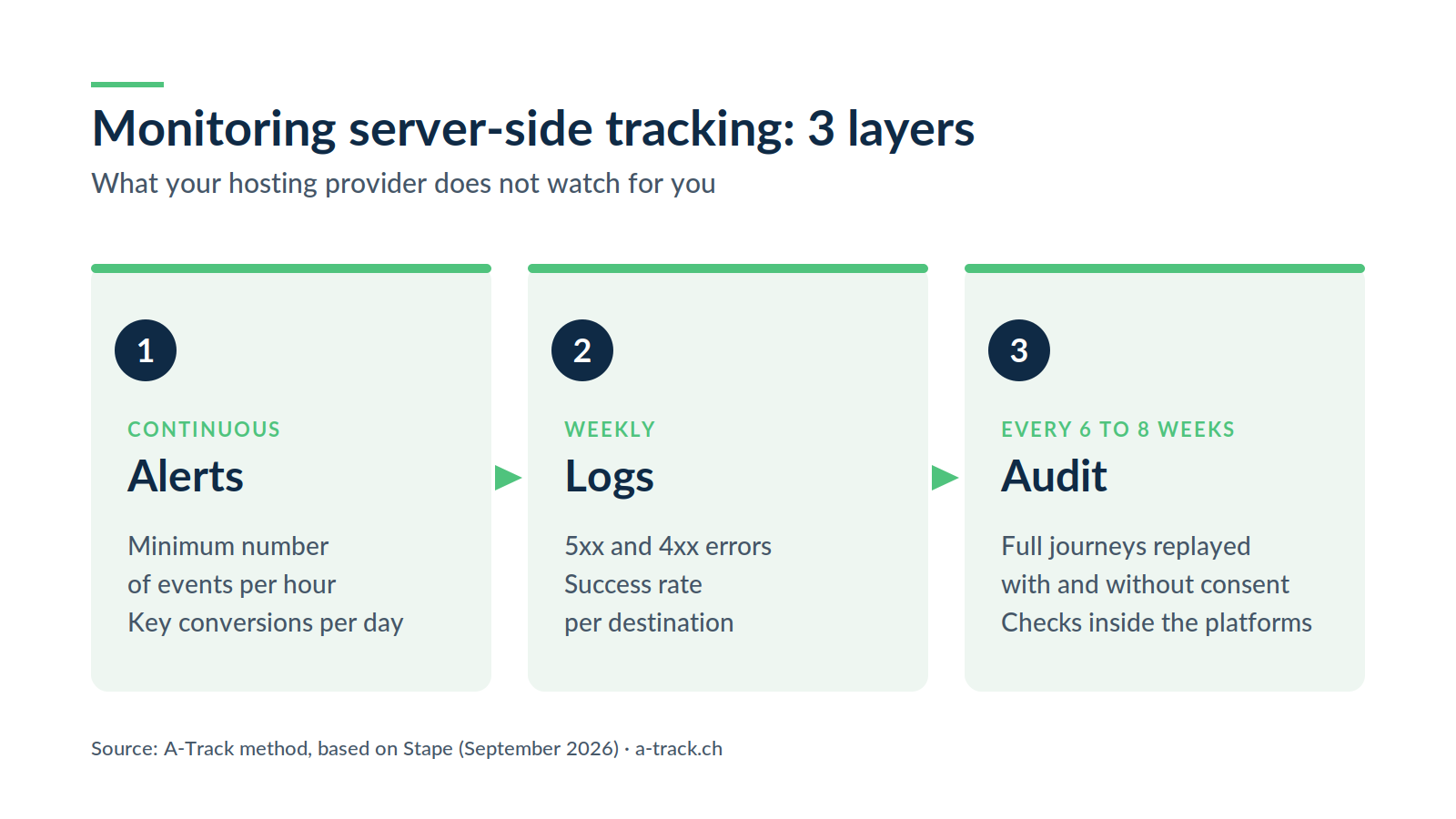
Continuous: alerts. A minimum number of events per hour and a daily check on your main conversions.
Weekly: logs. 5xx and 4xx errors, success rate per destination.
Every six to eight weeks: the audit. Full journeys replayed, with and without consent.
The method we use with our clients follows the three layers described by Stape in its post-launch guide, adapted to the traffic levels of Swiss SMEs.
Layer 1: automated alerts on volumes
The principle is simple: set a minimum number of events per hour and get notified when it is not reached. In her guide, the author describes an alert that fired below ten page views per hour and warned her within an hour of a release that had broken tracking.
Calibration is the key. The threshold must be based on your quietest hours, not your average. A B2B website in Lausanne or Zurich with very few night-time visits will trigger false alarms if it uses the same threshold as a national e-commerce site. We recommend:
a "complete outage" alert on incoming events, set against the quietest hour of the week;
one alert per critical destination (Google Ads, Meta, GA4) on the success rate of outgoing requests;
a daily alert on your main conversions, compared with the same weekday a week earlier.
Layer 2: a weekly log review
Five to ten minutes a week is enough. Scan incoming and outgoing requests, look for 5xx errors first, then 4xx spikes, and check that every destination accepts requests.
The weekly rhythm is not arbitrary. At Stape, logs are kept for 3 days on the Pro plan and 10 days on the Business and Enterprise plans. If you only look once a month, you will never see the outage that happened three weeks ago. On Google Cloud Run the logic is the same: logs exist, but someone has to read them and set up alerts.
Layer 3: a full audit every six to eight weeks
This is the cadence Stape's guide recommends for manual maintenance. The audit means replaying critical journeys in preview mode, in both the web container and the server container:
a complete purchase or contact journey, with and without consent;
a check of the parameters sent to each platform (value, currency, transaction ID, hashed user data);
a check of deduplication between the browser pixel and the conversion API;
verification inside the platforms themselves, not only in GTM preview.
That last point matters: a tag firing in preview does not prove that the platform received and accepted the data. To structure this audit, you can use our 15-point tracking audit checklist.
And after every website release
Add one simple rule to the web agency's release process: after every deployment that touches a template, the checkout or the cookie banner, run a quick test of the main conversions. Ten minutes of testing saves weeks of lost data.
Why is monitoring also an FADP and GDPR compliance issue?
Monitoring is not only about performance. An update can also make your website inconsistent with what you publicly state.
A common example: after a CMP or theme change, the default consent state is no longer set before the tags. Requests go out to advertising platforms before the visitor has chosen anything, while your privacy notice promises the opposite.
Art. 7 FADP requires the controller to put technical and organisational measures in place from the design stage of the processing, and to ensure through appropriate default settings that processing is limited to the minimum required for its purpose. Regular monitoring of how your tags actually behave is part of those measures: it lets you show that what you announce matches what happens. For visitors located in the European Union, the GDPR sets comparable requirements, and both the FDPIC and European authorities look at what a website really does, not only at what the banner says.
We are not suggesting you turn every alert into a legal file. But a simple log of the checks you run (date, journeys tested, issues fixed) is a useful document the day a client, an auditor or the FDPIC starts asking questions. Our in-depth article on server-side tracking explains why this architecture makes that kind of control easier.
What does an outage look like in a Swiss SME?
Here is a typical scenario. It is fictional, but built from the situations we see most often in audits.
An online shop in the canton of Vaud selling local produce switches to a new theme on a Thursday evening. The new theme rewrites the order confirmation page. The GTM snippet is still in the header, but the block that pushed the purchase event to the dataLayer was not carried over.
Without monitoring: page views arrive as usual and traffic reports look reassuring. Google Ads and Meta campaigns keep spending. Two or three weeks later, someone notices that ROAS has collapsed. It takes several more days to find the cause, and the conversion history for that period is lost to the algorithms.
With monitoring: on Friday morning, the daily alert reports zero measured purchases while the shop has recorded orders. The fix goes live the same day. The impact is limited to a single day.
The difference has nothing to do with the technology in use. It comes down to having a check in place, and a person who reads it.
Who should own monitoring: the web agency, the marketing agency or the business?
This is often where things go wrong. Everyone assumes someone else is watching. We recommend a clear split of responsibilities.
The web agency gives notice before any release that touches templates, the checkout or the CMP, and tests the main conversions after going live.
The marketing agency follows conversions in the ad platforms and flags any unexplained drop, without editing the server container itself.
The tracking owner (internal or external) receives alerts, reviews logs weekly, runs the periodic audit and keeps the log of checks.
The business appoints an owner for access rights (GTM, sGTM hosting, ad platforms) and signs off changes to the CMP or the privacy notice.
For an agency, formalising this split is also a sales argument: you are selling measurement that stays reliable over time, not a one-off installation.
How A-Track can help
We support SMEs, web agencies and marketing agencies in Switzerland across the whole lifecycle.
Implementation: server-side architecture, CMP, Consent Mode and API connections, through our Tracking & Compliance service.
Monitoring and maintenance: calibrated alerts, log reviews, periodic audits, technical and regulatory watch, through our Annual Maintenance service.
For agencies: we work white-label or alongside your teams, so your clients keep reliable data without your team spending its weeks on it.
Conclusion: going live is only the beginning
A well-built server-side setup remains one of the best decisions you can make for your marketing data. But its value depends on how reliable it stays over time. The most expensive failures are not the spectacular ones: they are the partial, silent outages nobody notices for weeks.
Your next step: check today whether anyone gets an alert when your conversions drop to zero. If the answer is no, start there. And if you would like an outside view of your current setup, let's talk about your maintenance.
Sources: Stape, Server-side tracking doesn't stay fixed (2 September 2026); Stape, CMP not pushing consent update event to dataLayer (9 September 2026); Google, Consent Mode documentation; Fedlex, Federal Act on Data Protection (FADP, SR 235.1).