

Table of content
Does your agency run both Shopify and WooCommerce stores, and tracking never behaves the same way twice? That is normal: one is a locked-down SaaS, the other a WordPress plugin open to anything. What works on one breaks on the other, and moving to server-side needs a different plan for each.
In short
Shopify: old checkout scripts no longer run; tracking now goes through custom pixels and webhooks.
WooCommerce: total freedom with GTM4WP, but watch out for cache and optimisation plugins.
Twint and PostFinance: when the customer never returns to the "Thank you" page, only a server-side confirmation saves the sale.
On both platforms, the visitor's choice must follow the data all the way to the server.
Shopify: the locked fortress (but a robust one)
A closed environment: reassuring for security, restrictive for measurement.
Checkout Extensibility: the end of hacks
For years, agencies pasted GTM into checkout.liquid or the "additional scripts" box. That is over: according to the Shopify documentation, these scripts no longer run on the "Thank you" and "Order status" pages since 28 August 2025 for Plus stores, and since 26 August 2026 for all others.
The right method: Customer Events (custom pixels) or an app built on them.
The constraint: these pixels run in a sandbox, isolated from the page. Access to cookies and the DOM is limited, so a "classic" web GTM does not behave there as it does in the theme.
The A-Track approach for Shopify
Native events: Shopify exposes standardised events (product viewed, added to cart, checkout completed). No need to hand-code a dataLayer.
Sending to the server: these events are forwarded to your server-side tracking, through a custom pixel or a specialised app (Stape offers one).
Order webhooks: for sales the browser never sees, Shopify can notify your server after payment, independently of the browser.
Consent: link each pixel to the visitor's privacy permissions in Shopify, and pass the consent state along with server events.
WooCommerce: total freedom (and its risks)
WooCommerce is a WordPress plugin: you have access to all the PHP code. A developer's paradise, and sometimes a maintenance nightmare.
The A-Track approach for WooCommerce
GTM4WP: this free plugin (Google Tag Manager for WordPress) injects a GA4-format e-commerce dataLayer (items, value, currency, tax) without development.
Server-side: GTM then sends the data to your server container, on your own subdomain.
The risk of conflicts: cache or JavaScript optimisation plugins can break the dataLayer's loading order. Test a purchase after every update.
The Swiss headache: Twint, PostFinance and the "Thank you" page
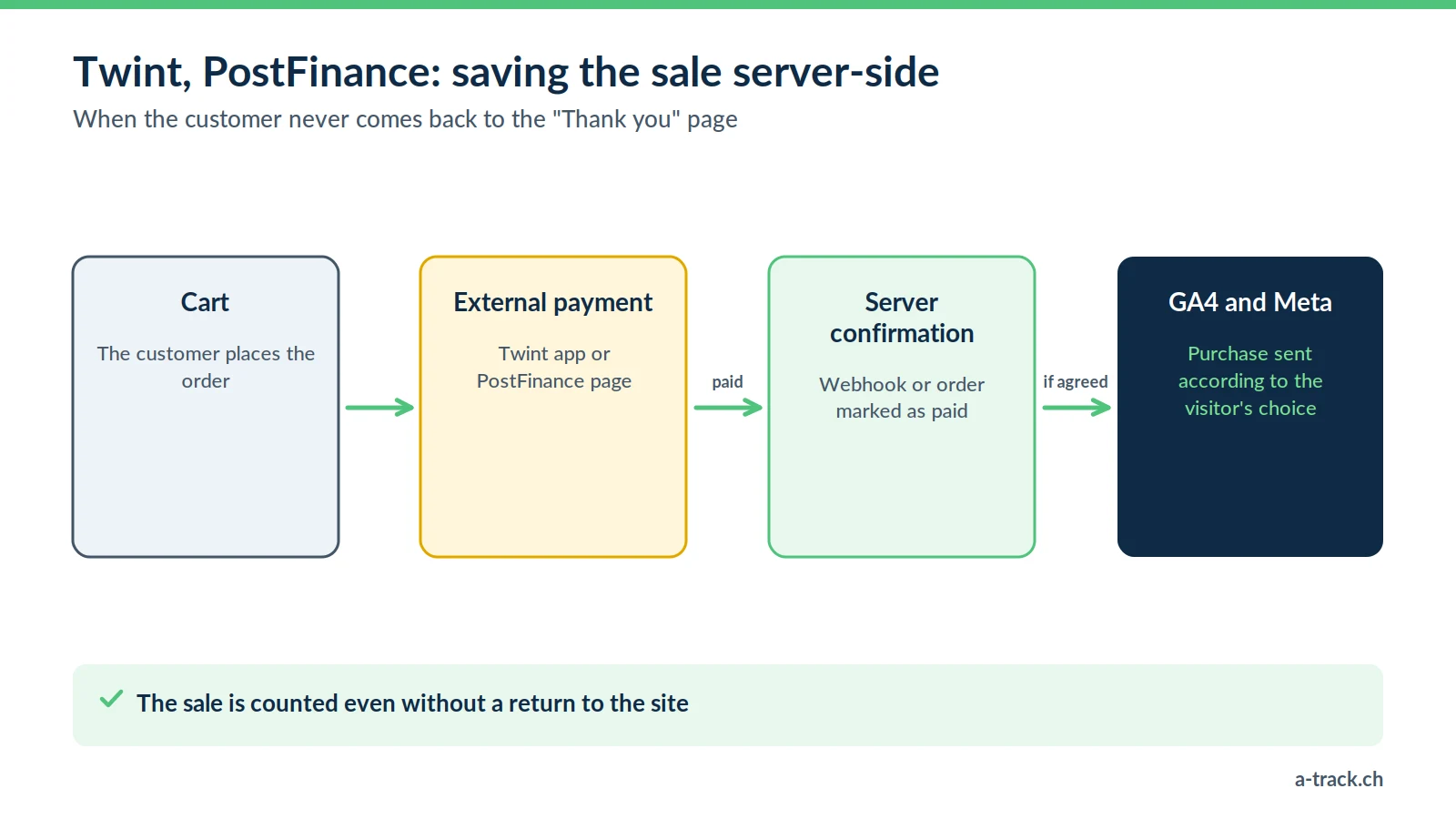
This is common to both CMSs, and a frequent cause of missing sales in Switzerland. The customer leaves the site to pay in the Twint app or with PostFinance, and does not always come back to the confirmation page.
Result: the money is collected, but GA4 and Meta see no sale.
On Shopify: rely on order webhooks to confirm the sale on the server side.
On WooCommerce: fire the purchase event when the order status changes (payment confirmed by the gateway), not when the "Thank you" page is displayed. Some payment plugins already expose this server callback; otherwise, a small development does the job.
Watch out: a purchase sent from the server must respect the choice the visitor made on the site. A refusal stays a refusal. For payment and booking returns on another domain, see also our article on cross-domain tracking.
Technical comparison for agencies
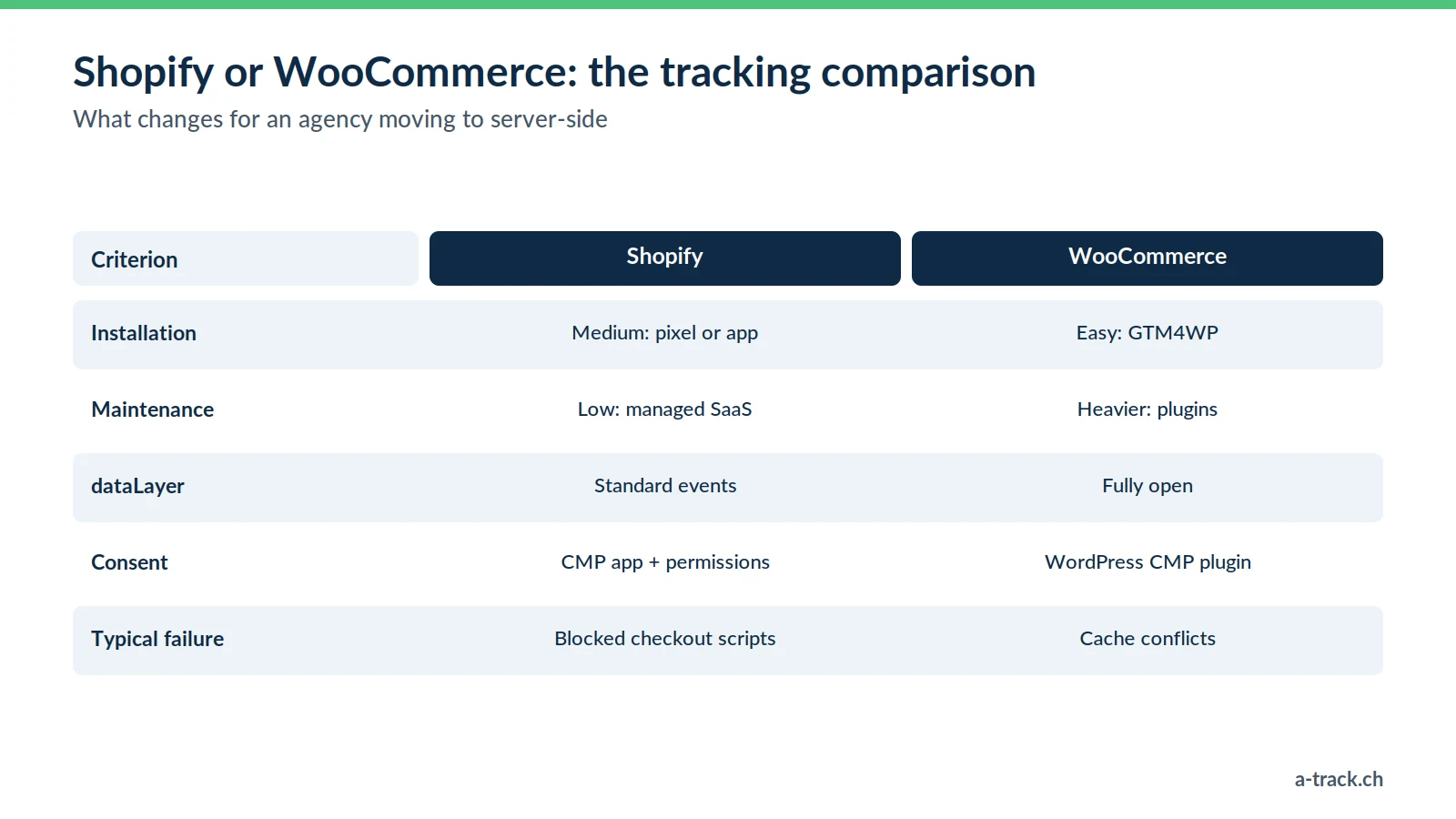
Installation: medium on Shopify, easy on WooCommerce (GTM4WP).
Maintenance: low on Shopify (managed SaaS), heavier on WooCommerce.
DataLayer flexibility: standard events on Shopify, total on WooCommerce.
Consent: a CMP app (for example Cookie-Script) or a WordPress plugin.
Typical failure: blocked checkout scripts on Shopify, cache conflicts on WooCommerce.
Conclusion: what to do this week
A-Track tip
On Shopify, stop placing GTM "the old way" in the theme to track the checkout: move to custom pixels, backed by webhooks for external payments. It is the only method that survives Shopify's security updates.
Check every Shopify store: no tracking should still depend on additional scripts.
On WooCommerce, test a full purchase with caching switched on.
Compare Twint and PostFinance sales in the back office with GA4: the gap tells you whether you need server-side confirmation.
Twint sales missing from GA4 and Meta?
A-Track adapts server-side to each shop: custom pixels and webhooks on Shopify, GTM4WP and order status on WooCommerce, with consent passed to the server.
Let's discuss your stores in a 30-minute call with an expert.