
Table of content
It is the oldest conflict in B2B agency life. The agency: "Look, we brought you 50 leads this month, and cost per lead is down!" The sales director: "Yes, but none of them signed." Who is right? Often both, because the agency optimises for lead volume while the client wants contracts.
In short
Google and Meta see the submitted form, but not what happens next in the CRM.
Offline conversion tracking sends qualified leads and signed deals back to the platforms.
With Google, a click (GCLID) can be imported up to 90 days later: plan for intermediate stages.
Hashed emails are still personal data: transparency and consent still apply.
What is offline conversion tracking?
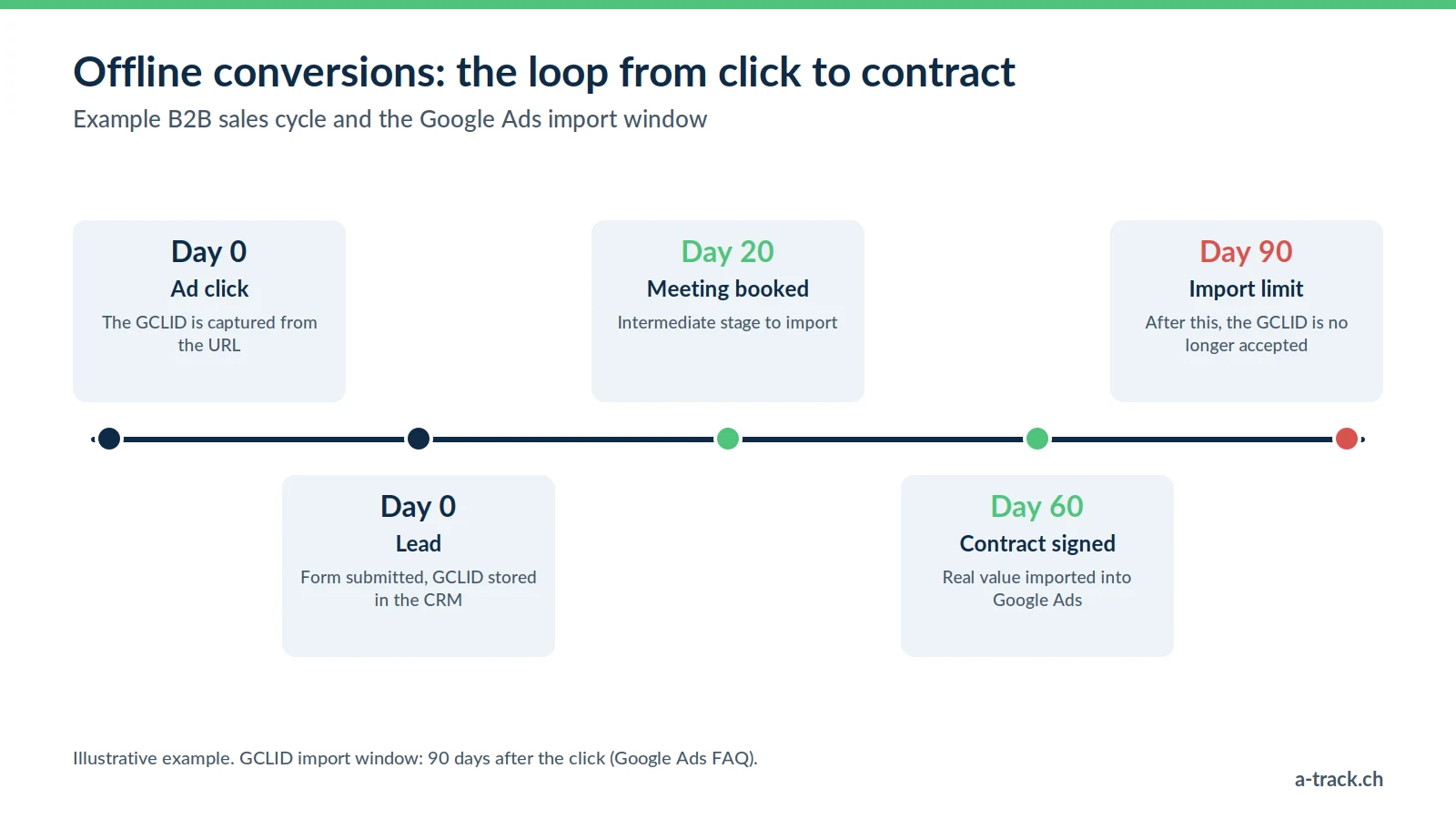
The problem is a data gap: ad platforms go blind as soon as the prospect enters the CRM or the salesperson's calendar. Offline conversion tracking closes the loop:
The click: the user clicks an ad. You capture the click identifier (GCLID for Google, fbclid for Meta).
The lead: they fill in a form. The identifier is stored in their CRM record.
The sale: a few weeks later, the salesperson sets the status to "Won".
The feedback: the CRM, or a server-side connector, tells the platform: "this click generated a contract worth this much".
It is the only way to steer campaigns on the real value of sales, even when the deal is closed over a meeting in Lausanne.
Why it matters so much for Swiss agencies
A large part of the Swiss economy relies on high value-added services: private banking, insurance, clinics, real estate, construction, software. Nobody buys these through an online cart. Without offline conversions:
You optimise for the curious: algorithms look for people who fill in forms, not people who sign.
You undervalue your work: you cannot prove that the March campaign brought in the contract signed in June.
Building the pipeline in three steps
Step 1: capture the click identifier
Add a hidden field to every form.
With Google Tag Manager, read the gclid URL parameter (Google's click ID) or fbclid, and keep it for the rest of the visit.
When the form is submitted, the identifier goes to the CRM along with the name and email.
Step 2: store it in the CRM
This is often where things stall: the CRM must be able to hold this data.
Salesforce, HubSpot, Pipedrive: custom fields and ad integrations are available.
Swiss tools (Bexio, Winbiz, SecuTix): depending on the tool, you need a custom field and the API. This is where an integrator builds the technical bridge.
Step 3: send the conversions back
Manual import: a weekly CSV export from the CRM uploaded to Google Ads. Fine to start with, but fragile over time.
Automated import: Zapier, Make or a server-side connector sends the data through the API as soon as the status changes.
Mind the deadline: Google states that a GCLID-based conversion must be imported within 90 days of the click (Google Ads FAQ). For longer sales cycles, import an intermediate stage reached within that window.
Bidding: moving to value-based bidding
Once the data flows back, the strategy changes. Instead of asking Google for leads at a target cost per acquisition, you ask it to maximise contract value, for example with a target ROAS (tROAS).
The algorithm then learns, for instance, that a Geneva lead searching "wealth management" is worth more than a generic lead from elsewhere, and adjusts its bids accordingly. This requires enough imported conversions and consistent values. See also our article on Smart Bidding and data quality.
FADP compliance and enhanced conversions for leads
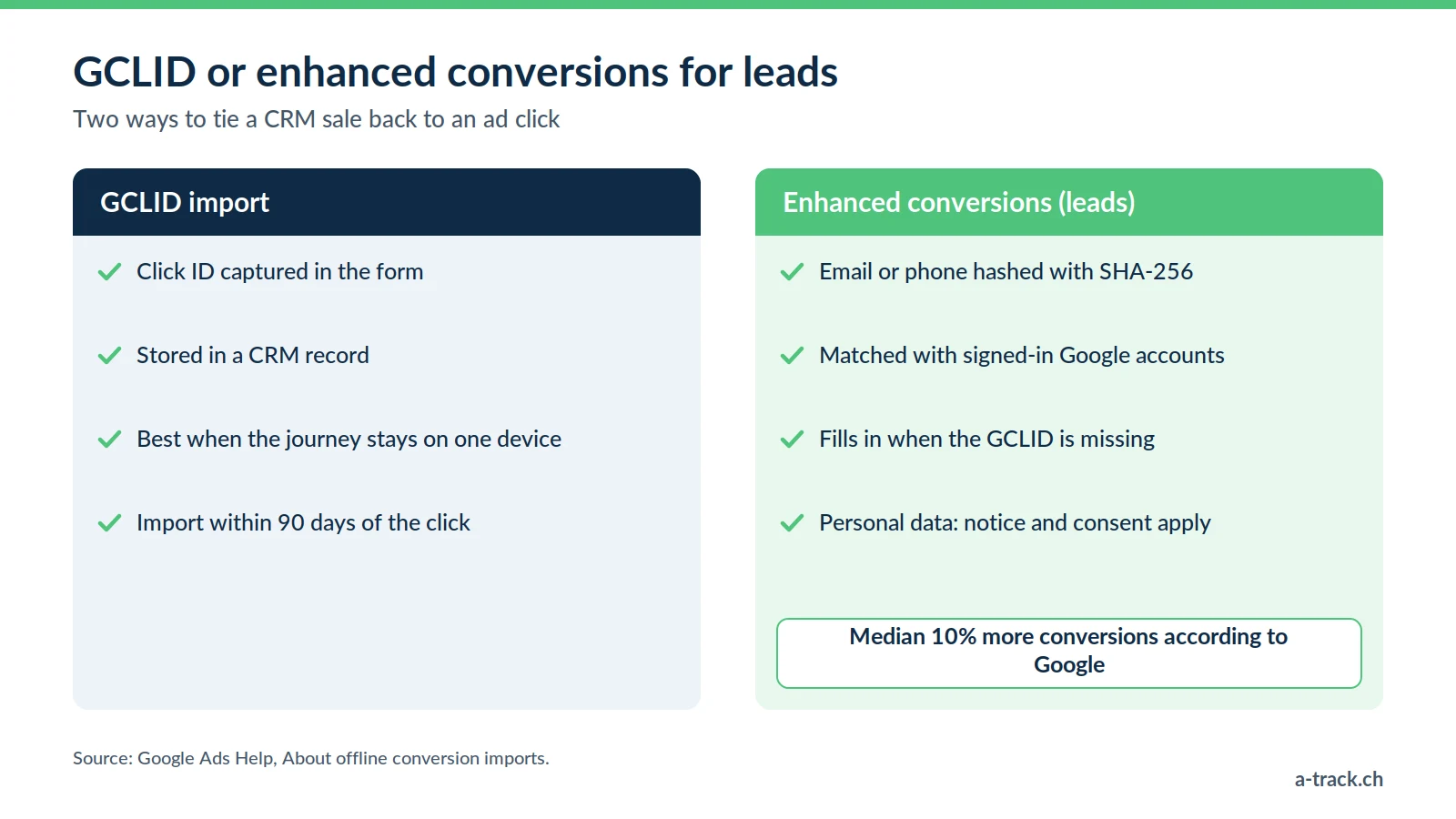
Sometimes the GCLID is missing: a click from another device, a parameter lost along the way. Google then offers enhanced conversions for leads: instead of the click ID, the sale is matched using a hashed email or phone number (SHA-256), which Google compares with signed-in accounts. According to Google, advertisers who supplement the GCLID with this first-party data saw a median 10% increase in conversions.
Under the FADP, one important nuance: hashing is a security measure, not anonymisation. A hashed email is still personal data, since Google can match it to an account. So you must:
mention this transfer and its recipients in your privacy policy;
respect the visitor's choice: for EU traffic (GDPR), and under Google's policy for Switzerland since 31 July 2024, consent to the advertising use of data (ad_user_data) is required;
check the framework for transfers to the United States (Swiss-U.S. Data Privacy Framework in force since 15 September 2024).
For the full picture, see our FADP and GDPR compliance guide.
Conclusion: send intermediate stages too
A-Track tip
Do not send only the final sale. Also import qualified stages such as "discovery meeting booked" or "proposal sent". The algorithm gets signals earlier, and you stay within Google's 90-day window even when the sales cycle lasts six months.
Add hidden GCLID and fbclid fields to your forms this week.
Create the matching field in your CRM and define which stages to send back.
Automate the import, then move gradually to value-based bidding.
Do your campaigns know which leads actually sign?
A-Track captures the GCLID in your forms, links it to your CRM and automates sending qualified stages back to Google Ads and Meta, respecting consent.
Let's review it in a 30-minute call with an expert.