

Table of content
"Are we still allowed to use Google Analytics?" The question comes up in many marketing meetings in Switzerland. Between the FADP and data transfers to the United States, some companies switch to Matomo or Plausible and lose the Google ecosystem along the way (Ads, BigQuery). There is another route: keep GA4, but change how data reaches it.
In short
In a standard setup, the visitor's browser sends requests straight to Google, full URL included.
A server-side GA4 setup acts as customs: it inspects and cleans every event before forwarding it.
Three key clean-ups: the IP address, personal data in URLs, device details.
Cleaning reduces risk; it does not replace consent or an up-to-date privacy policy.
The problem: a direct line to Google
In a client-side setup, the Google Analytics script runs in the visitor's browser:
The user visits yourclient.ch.
Their browser sends a request directly to Google's servers.
That request technically carries the IP address (needed for the connection), the browser's User Agent and the full page URL.
Google states that GA4 does not log IP addresses of users in Switzerland and the EU and only uses them for coarse geolocation (Google Analytics Help). But you do not control what gets sent: if an email address sits in the URL, it goes through as is. Google has been certified under the Swiss-U.S. Data Privacy Framework since 15 September 2024, which frames the transfer but does not exempt you from informing your visitors.
The solution: a server that acts as customs
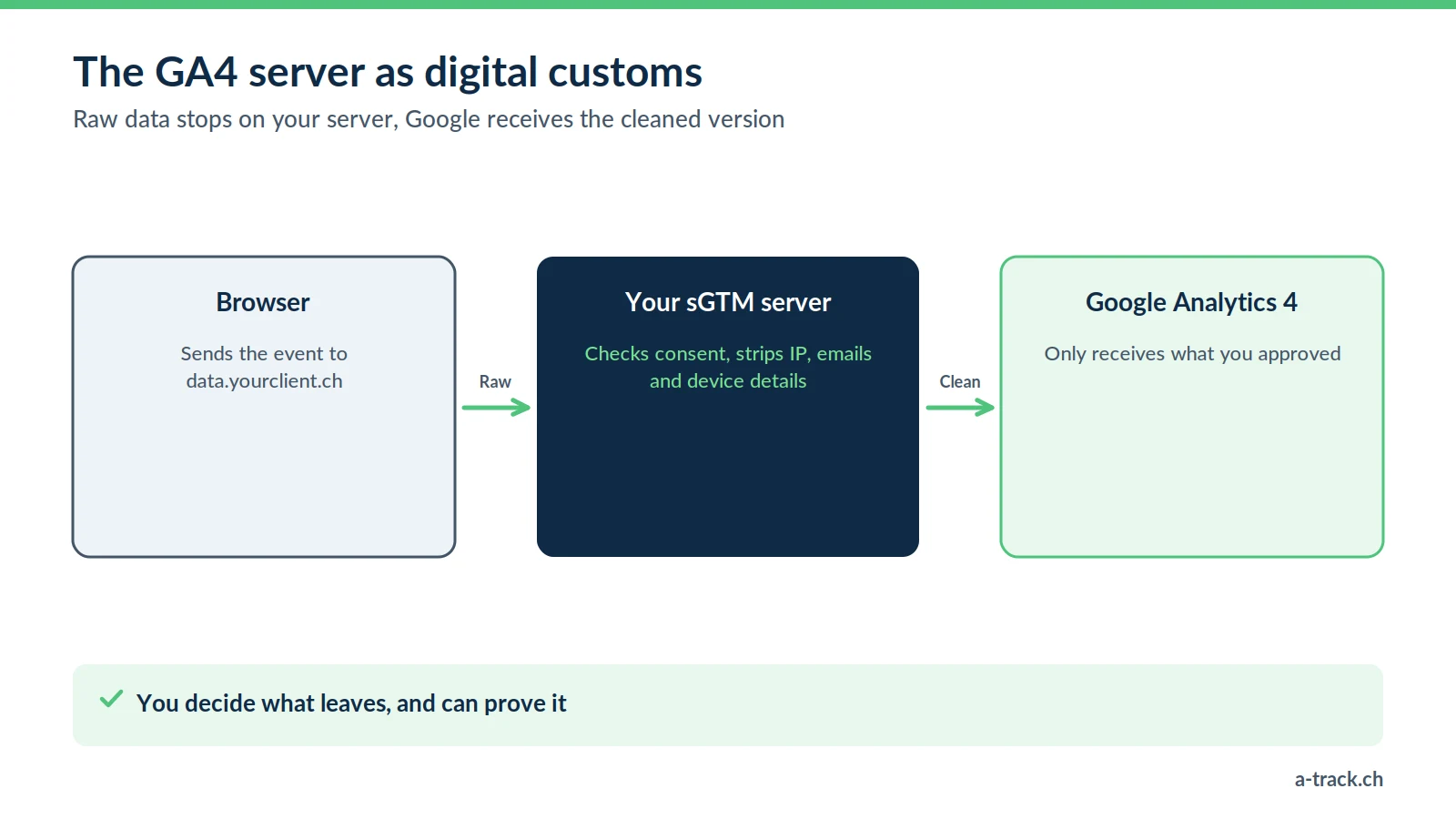
Server-side tracking puts an intermediary that you control in the middle. Instead of talking to Google, the browser talks to your server, for example data.yourclient.ch, a proxy hosted with Stape.
The server receives the data, inspects it, modifies it, and only then forwards it to Google. That is where cleaning happens. The full setup is described in our guide to GA4 server-side with Stape.
The three steps of data cleaning
![Server-side GA4 cleaning checklist: IP removed or truncated, emails replaced with [REDACTED], User Agent reduced, Google Signals off; to avoid: plain-text email in a URL.](https://www.a-track.ch/storage/psqkq3wxDHdvGecXMX4xmD3ogCm3L3H7LgjHx8bH.webp)
Here is the procedure we apply to GA4 accounts in sensitive sectors (banking, insurance, healthcare).
1. The IP address: remove or truncate
On the server: we configure the container to remove or truncate the IP address in the request sent to Google.
The trade-off: without an IP address, GA4 can no longer geolocate the visitor properly, or places them where the server is. To keep country or region-level geolocation, send a truncated IP or geographic fields computed server-side instead.
2. Personal data in URLs (PII)
A classic mistake: a form redirects to a confirmation URL containing the email in plain text (?email=jane.doe@example.ch).
The risk: Google Analytics policies prohibit sending information that identifies a person, URLs included. Under the FADP, it is personal data shared for no reason.
The server-side fix: a transformation rule scans incoming URLs and parameters. If an email or phone pattern is detected, it is replaced with [REDACTED] before anything is sent to Google.
As a complement: also enable the built-in data redaction (emails and query parameters) in GA4 web streams.
3. Reducing the User Agent
The User Agent describes the device in detail (model, OS version). Combined with other signals, it makes fingerprinting easier. The server can simplify it to keep only the essentials (mobile or desktop, browser), making the visitor harder to single out.
A-Track tip
Watch out for Google Signals. Once enabled in GA4, they link data to users signed in to their Google account who have allowed ad personalisation. That can weaken your anonymisation. For highly sensitive clients, keep this option switched off.
Stape hosting: what really changes
"If the server runs on Google Cloud, what difference does it make?" A fair question. Stape offers two kinds of hosting (Stape documentation):
Global hosting: run by Stape on Google Cloud, with several zones in Europe.
EU hosting: run by a European Stape entity on the infrastructure of Scaleway, a European provider, for companies with stricter processing requirements.
Stape has no zone in Switzerland. For a Swiss company, EU hosting remains acceptable: EU states are among those the Federal Council recognises as providing adequate protection. The real gain lies elsewhere: raw data (IP, full URLs) stops on a server whose rules you set. To compare hosting options, read our guide Infomaniak, Google Cloud or Stape.
How to explain this safeguard to your clients
For your clients, cleaning may feel abstract. Here is an honest way to put it:
"Today, a standard Google Analytics setup sends Google everything the page contains, including personal data slipped in by mistake. With a server-side proxy, we add a filter: IP addresses, emails and device details are removed before sending. Benefit: you keep Google's power for your marketing while applying the privacy by design principle set out in the FADP (Art. 7). And if you are audited, you can show exactly what goes to Google."
Avoid promises like "bulletproof": server-side reduces risk, it does not remove it. Consent, the privacy policy and the record of processing activities are still required. The full picture is in our FADP and GDPR compliance guide.
Conclusion: your cleaning checklist
Look for emails or phone numbers in the URLs collected by GA4 (Pages report, last 30 days).
Choose between removing and truncating the IP based on your geolocation needs.
Set up the server-side cleaning rules, then check outgoing requests in the container preview.
What is your GA4 really sending to Google?
A-Track sets up a GA4 server that removes or truncates the IP, masks emails in URLs and reduces the User Agent before anything reaches Google.
First see what leaks with a free tracking and compliance audit, delivered within 48 hours.