

Table of content
Your GA4 reports show too many "new users", sales credited to direct traffic and campaigns that seem to deliver nothing? The culprit is often the standard, browser-based setup. Ad blockers, Safari's restrictions and the FADP all weaken it: server-side tagging with Stape puts you back in control.
In short
Installed in the browser, GA4 loses visitors (ad blockers) and memory (cookies capped at 7 days, sometimes 24 hours, by Safari).
A server-side Google Tag Manager container hosted by Stape, on your own subdomain, receives the data before Google does.
The server lets you strip personal data and enforce consent before anything reaches a third party.
A refusal stays a refusal: server-side makes measurement more reliable, it does not replace the banner or Consent Mode.
Why standard GA4 loses data
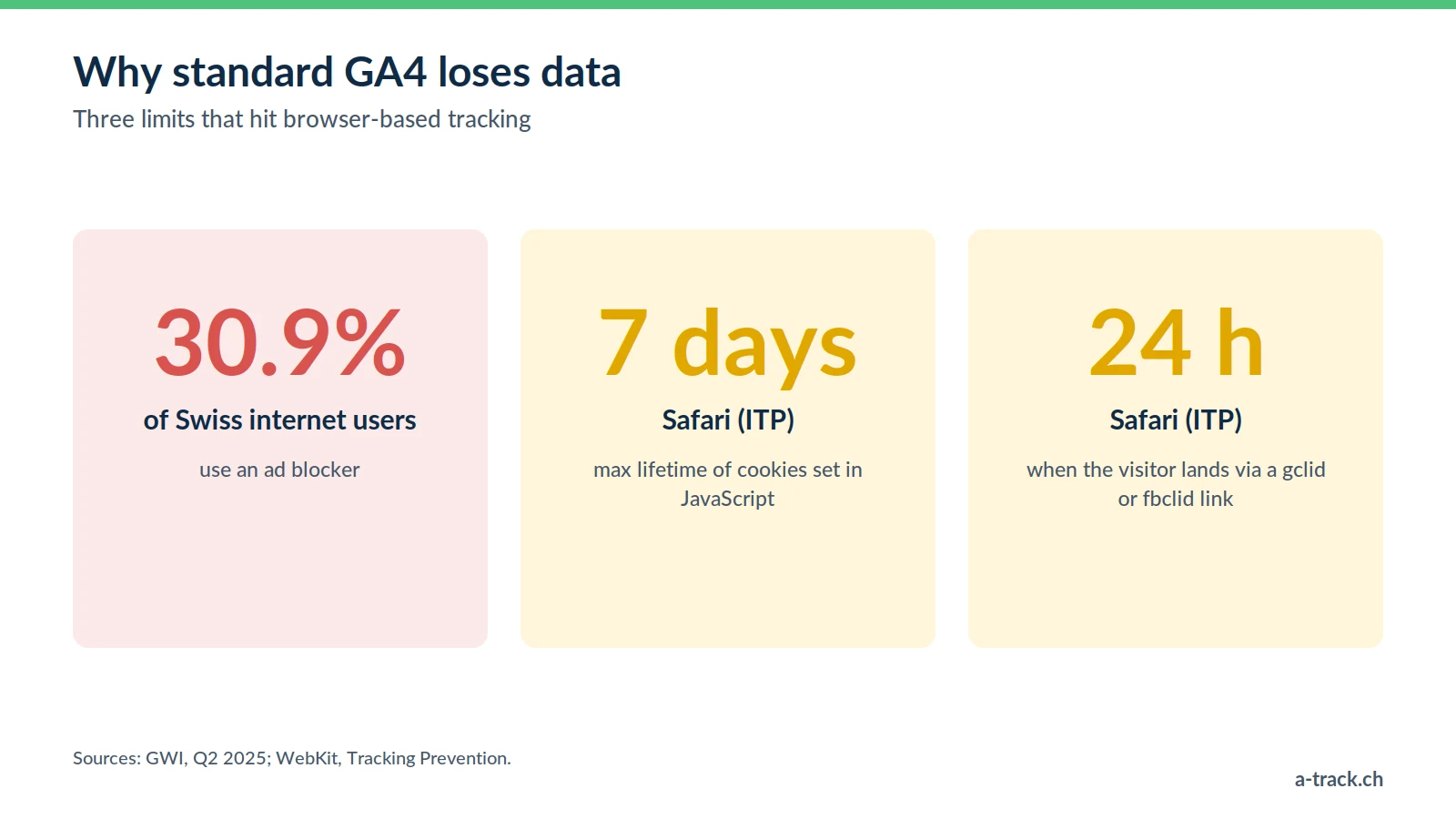
In a standard setup, the visitor's browser runs the gtag.js script and sends data straight to Google's servers. That model runs into two technical limits and one legal question.
1. Safari's ITP shortens GA4's memory
On Safari (iPhone, iPad, Mac), ITP (Intelligent Tracking Prevention) restricts cookies created in JavaScript. According to WebKit's documentation, they are deleted after 7 days without interaction, and capped at 24 hours when the visitor lands via a decorated link (for instance with a Google Ads gclid or a Meta fbclid).
In practice: a prospect clicks your ad on the 1st, comes back on the 10th through a Google search and buys. By then the _ga cookie is gone. GA4 counts two users instead of one and credits the sale to organic search, not to the campaign that started the journey.
2. Ad blockers make part of your traffic invisible
According to GWI (Q2 2025), 30.9% of Swiss internet users use an ad blocker. Many of these extensions, and browsers such as Brave, also block requests to Google Analytics domains. Those visits simply never show up in your reports.
3. The legal question: who receives what?
Client-side, your Swiss visitor's browser talks directly to Google. Google states that GA4 does not log or store IP addresses of users in Switzerland and the EU (Google Analytics Help), but the request itself, including the full URL, still goes to a third party. One email address accidentally passed in a search or form URL is enough to send personal data. Under the FADP, you remain responsible for what your tools send.
The solution: GA4 server-side with Stape
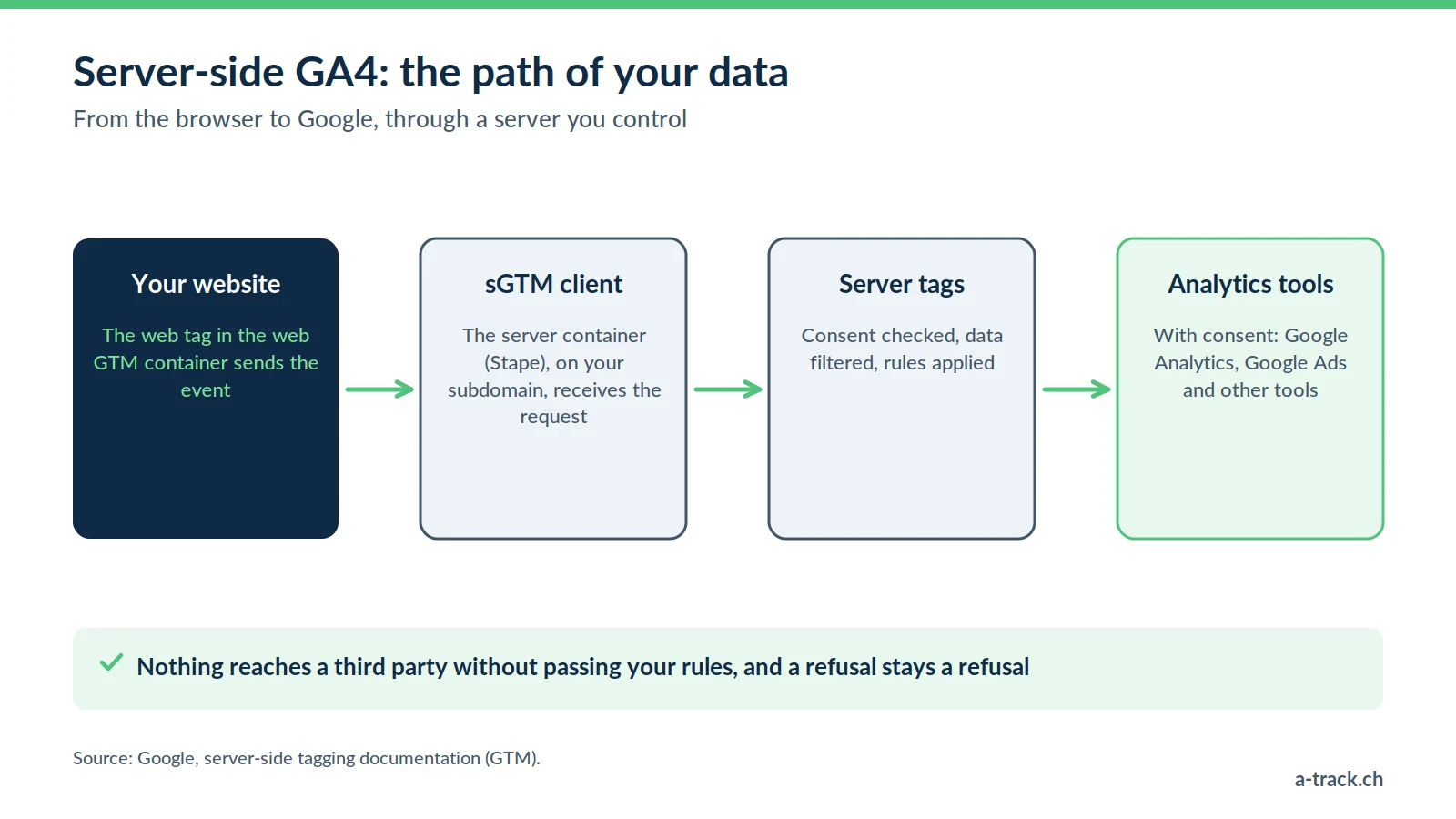
The idea is simple: instead of letting the browser talk to Google, you place a server you control in between. That is the job of the server-side Google Tag Manager (sGTM) container, which we host with Stape, our go-to sGTM hosting platform.
How the data flows
Collection (web GTM): the browser sends events (page views, add to cart, purchases) not to Google but to your server.
Control (sGTM): the server checks the consent state, removes sensitive data and applies your business rules.
Distribution (GA4): once validated, the data is forwarded to GA4, and only what you decided to send.
Google puts it plainly in its server-side tagging documentation: only you have access to the data on the server until you choose to send it elsewhere.
The custom subdomain: your first-party foundation
The key piece is the custom domain, for example metrics.your-site.ch. Requests travel from your site to your own subdomain: this is first-party measurement. It is more resilient to browser restrictions, without changing anything about the visitor's choice. For Safari to genuinely treat that subdomain as yours, it must be set up correctly (see below).
Setting up GA4 server-side for your CMS
Moving server-side forces you to tidy up your dataLayer. The GA4 client in the server container expects events in GA4 format: badly structured data is ignored or distorted.
WordPress and WooCommerce
A standardised e-commerce dataLayer, often via the GTM4WP plugin.
In the web GTM container, the Google tag (GA4) sends its events to your server URL instead of Google.
Server-side, the GA4 client receives the stream, rebuilds the e-commerce event and forwards it to GA4.
Shopify
A more closed architecture, especially without Shopify Plus: we use Stape's dedicated app or webhooks.
Key events (begin_checkout, purchase) can be sent from Shopify's back end.
The benefit: an order is no longer lost because the customer closed the confirmation page too quickly. Consent must of course still be respected for these events.
Prestashop, Webflow and custom sites
An audit of your existing dataLayer and a technical brief for your developers.
Events pushed using GA4 naming (item_id, price, currency, etc.), then a bridge between web GTM and sGTM.
A-Track tip
Before switching on the server, compare one week of orders in your back office with the purchases recorded in GA4. That baseline gap is your benchmark for measuring the real gain, rather than relying on generic promises.
The Stape features that matter for GA4
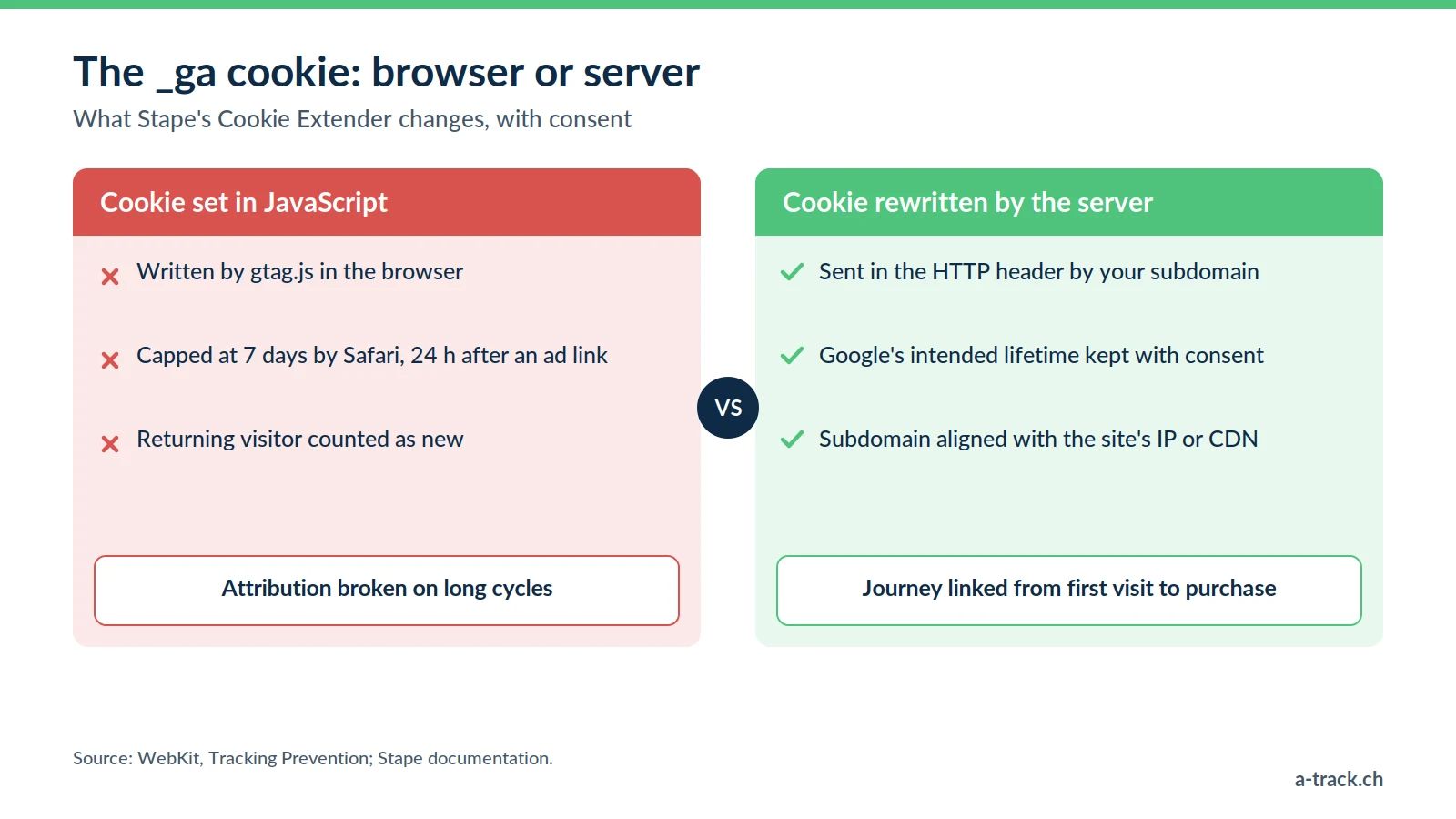
Stape adds features to sGTM that address the limits described above head-on.
Cookie Extender: extending GA4's memory
By default, the _ga cookie is written in JavaScript, so it falls under Safari's 7-day limit. Stape's Cookie Extender rewrites that cookie from the server, in the HTTP response header. It can then keep the lifetime Google intends (up to 2 years), only if the visitor has consented.
One detail makes all the difference: according to WebKit, Safari also caps at 7 days the cookies set by a server whose IP address does not match the website's ("IP address cloaking"). Your measurement subdomain must therefore be served consistently with your site, for example through the same CDN or a path on your main domain. This needs checking case by case.
Custom Loader: loading GTM from your domain
Stape's Custom Loader serves the GTM and GA4 scripts from your own subdomain, with custom paths. Requests stay first-party and are less exposed to generic block lists. It is not a way around the visitor's choice: tags remain subject to the banner and Consent Mode. More in our article on the GTM Custom Loader.
FADP and GDPR compliance: what the server really changes
Server-side is not a way to escape the law, it is a checkpoint. The server acts like customs: nothing leaves without passing your rules.
Google Consent Mode v2: Google requires it for its advertising features on European traffic and, since 31 July 2024, Swiss traffic. If the visitor refuses (analytics_storage = denied), no GA4 cookie is set. In advanced mode, only cookieless signals are sent for modelling. See our Consent Mode v2 guide.
Data cleaning: before anything is sent to Google, the server can truncate the IP address, drop unnecessary identifiers and strip personal data (PII) such as email addresses from URLs. Our article on GA4 data cleaning covers these rules.
Server location: Stape offers hosting zones in Europe, so the first handling of the data happens in a setup you control. Data then sent to Google is still a transfer to document in your privacy policy (Google is certified under the Swiss-U.S. Data Privacy Framework, in force since 15 September 2024).
On sanctions, the revised FADP, in force since 1 September 2023, provides for fines of up to CHF 250,000 against the responsible individuals for intentional violations (Art. 60 to 66). The full picture is in our FADP and GDPR compliance guide.
What results to expect, without magic promises
A well-configured server-side GA4 changes the quality of your analysis. The exact gain depends on your audience (share of Safari, ad blockers, consent rate): it is measured, not promised.
A more complete audience: part of the visits previously blocked by generic filters becomes measurable again, for visitors who accepted measurement.
Fairer attribution: with cookies that last, the link between the first ad visit and the purchase is no longer cut after 7 days. Your acquisition campaigns regain their true weight.
Documented traceability: you know, and can show, which data goes to Google, after which filtering and on which consent basis.
A lighter browser: by moving some third-party tags to the server, you reduce the code running on the page.
For the business side, read our marketing performance measurement guide.
Conclusion: where to start
Measure today's gap between actual orders and GA4 purchases.
Check that your banner and Consent Mode v2 work before any migration.
Deploy sGTM on a properly configured subdomain, then check cookie lifetimes in Safari.
Is GA4 crediting your sales to the right channel?
A-Track compares your real orders with GA4 purchases, checks Consent Mode v2 and the _ga cookie lifetime in Safari, then tells you whether server-side is worth it.
A 30-minute call with an expert shows you where you stand.