

Table of content
TL;DR (Summary for Decision Makers)
The problem: Traditional GA4 tracking (Client-Side) is blocked by Adblockers, and Apple's ITP limits the lifespan of your cookies to 24 hours or 7 days. Result: your customer journeys are broken, and your returning users are counted as "new visitors." Moreover, sending data directly to the United States exposes your business to sanctions under the FADP.
The solution: GA4 Server-Side Tracking (SST) via a Google Tag Manager (sGTM) container hosted in Europe by Stape.
The A-Track advantage: We transform GA4 into a "First-Party" tool. Thanks to the Cookie Extender, we restore the attribution of your campaigns over the long term. Most importantly, our configuration acts as a firewall: we anonymize IP addresses and block personal data (PII) before it reaches Google's servers, ensuring your absolute legal compliance.
Action: Secure your dashboards and protect your users with a fully controlled data architecture.
If you run a business or a marketing agency in Switzerland, Google Analytics 4 (GA4) is probably your compass. It dictates your budgets, assesses the performance of your SEO/SEA campaigns, and justifies your ROI.
However, in 2026, if you are still using the standard GA4 installation method (the classic tag placed in your website's code), your compass is broken.
Between the technical restrictions imposed by web giants (Apple, Mozilla) and the strict requirements of the Federal Act on Data Protection (FADP), traditional "Client-Side" tracking has become a sieve coupled with legal risk.
At A-Track, we deploy Server-Side Tracking (SST) architectures through our partner Stape to save your analytical data. Here’s how we transform GA4 into a powerful, accurate, and 100% legal analytics tool.
Why standard GA4 tracking is a danger (and a sieve) in 2026
The native operation of GA4 relies on the user's browser. It is the browser that executes the gtag.js script and sends data directly to Google's servers. This model is currently under attack on two fronts.
1. Data massacre by Apple's ITP and Adblockers
If your client uses Safari (on iPhone or Mac), they are subject to ITP (Intelligent Tracking Prevention). This Apple technology is waging an open war against cookies created by JavaScript code.
The attribution problem: ITP limits the lifespan of GA4's main analytical cookie (the
_ga) to 7 days, or even 24 hours if the user comes from a URL containing tracking parameters (like agclidfrom Google Ads or afbclidfrom Meta).The impact: If a prospect clicks on your ad on the 1st of the month, browses your site, leaves, and returns to purchase on the 10th of the month via an organic search, GA4 will not recognize them. The cookie has been destroyed. GA4 will count two distinct users instead of one and will attribute the sale to SEO traffic, thus stealing the credit from your initial ad.
Moreover, over 30% of internet users use Adblockers (uBlock, AdGuard) or secure browsers (Brave) that completely block the download of the GA4 script. These visitors become ghosts in your reports.
2. Legal risk: GA4, US IPs, and Swiss FADP
Legally, the FADP (and GDPR) requires maximum transparency and protection of data. When GA4 is installed Client-Side, your Swiss visitor's browser communicates directly with Google's servers. In this process, the user's IP address and other metadata are exposed even before Google applies its own anonymization filters. Entrusting your data compliance to a GAFAM without a safety net is no longer an acceptable practice in a serious Data Governance strategy.
The solution: GA4 Server-Side Tracking with Stape.io
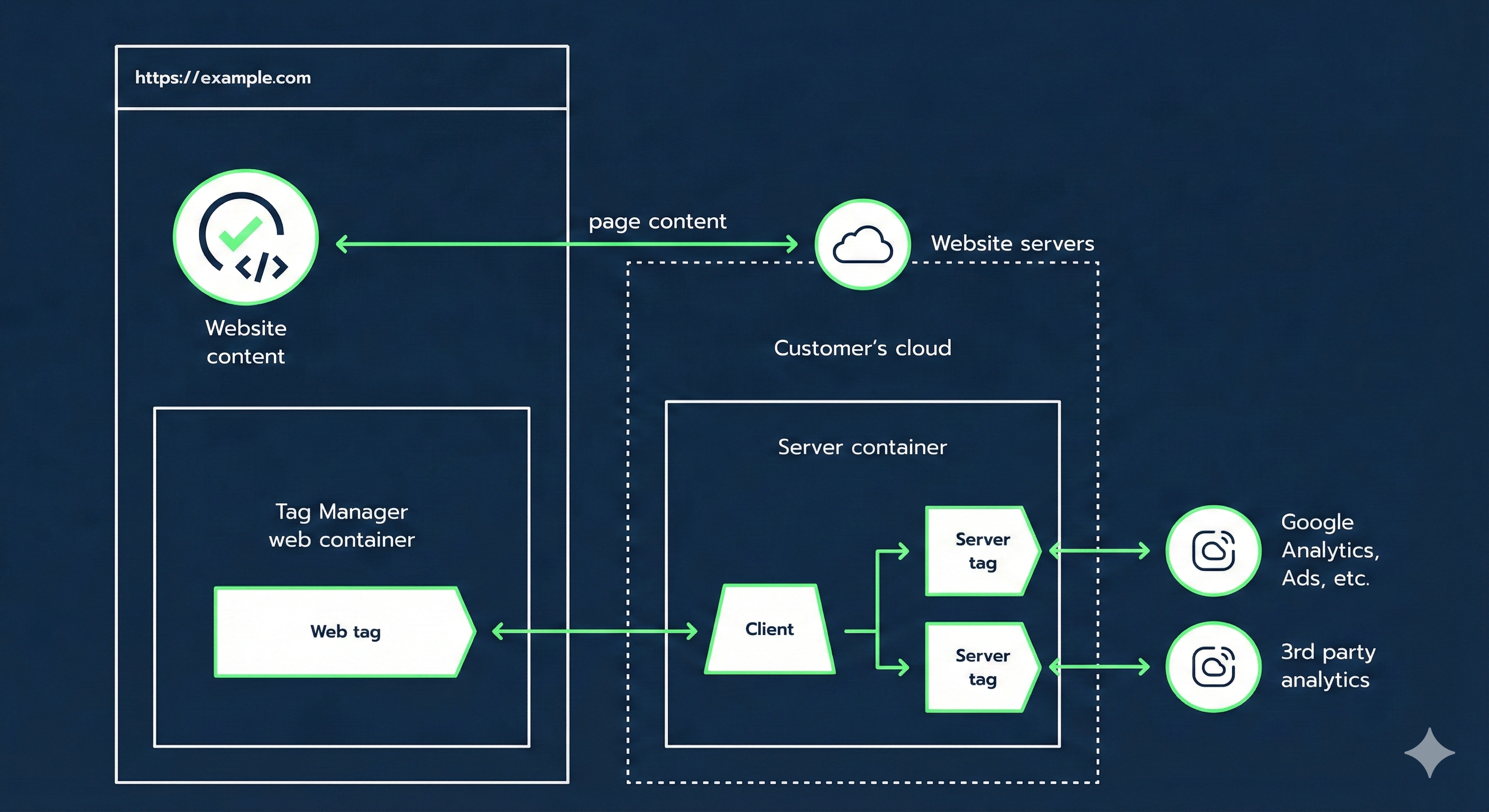
To circumvent these technical and legal obstacles, the only sustainable method is to change paradigms. Instead of letting the browser talk to Google, we interpose a private cloud server that you control. This is the role of the Google Tag Manager Server-Side (sGTM) container hosted on Stape's servers.
The functioning of the sGTM proxy by A-Track
The architecture we deploy works like an ultra-secure postal sorting center:
Collection (GTM Web): The user's browser collects behaviors (Page Views, Add to Cart, Purchases) and sends them not to Google, but to your own Stape server.
Cleaning (sGTM): Your server receives the raw data. This is where we apply our business rules: checking user consent, removing sensitive data, anonymization.
Distribution (Google Analytics): Once the data is validated and cleaned, the server formally sends it to GA4's servers.
The Custom Domain: Your First-Party Shield
The central element of our configuration with Stape is the use of a Custom Domain (e.g., metrics.your-site.ch).
Because requests go from your site to a subdomain of your site (a "First-Party" context), browsers like Safari and Adblockers consider this flow essential for the proper functioning of the site. Requests are no longer blocked, allowing for an instant clear view of your true traffic.
Steps to Configure GA4 Server-Side (Regardless of Your CMS)
Implementing GA4 Server-Side requires rethinking the structure of your Data Layer. The GA4 client in the sGTM is an extremely strict protocol: if the data does not arrive in the correct format, it is rejected.
Here’s how A-Track experts configure this mechanism according to your infrastructure:
1. WordPress & WooCommerce: The GTM4WP + sGTM Combo
For e-commerce merchants on WooCommerce, the goal is to ensure perfect reporting of Revenue.
We set up a standardized e-commerce Data Layer (often via GTM4WP).
In the GTM Web container, we configure the GA4 configuration tag to route 100% of the event flow to the URL of our Stape server.
On the server side, the native GA4 client receives the flow, reconstructs the e-commerce event, and transmits it to Google's Measurement Protocol.
2. Shopify: Securing an Often Opaque Funnel
Shopify poses unique challenges due to its closed architecture (especially without Shopify Plus).
We use the Stape integration dedicated to Shopify or custom Webhooks.
The GA4 Server-Side tag captures complex events (like
begin_checkoutorpurchase) directly from Shopify's backend.The direct benefit: No more sales that do not appear in GA4 because the user closed the order confirmation page too quickly. The server guarantees 100% delivery of e-commerce data.
3. Prestashop, Webflow, and Custom CMS
For other platforms, our approach relies on rigorous standardization.
We audit your existing Data Layer and write a technical specification for your developers.
Once standard events are pushed into the data layer (according to GA4's strict nomenclature:
item_id,price,currency, etc.), we create the bridge between GTM Web and sGTM.
The Essential Stape "Power-Ups" for GA4
The true added value of an implementation by A-Track lies in our mastery of Stape's advanced features. We do not just transit the data; we optimize it.
The Cookie Extender: Extend GA4's Memory
This is the ultimate weapon against Apple's ITP. In a classic configuration, the _ga cookie is placed by JavaScript (lifespan: 1 to 7 days). With the Stape Cookie Extender tool activated on our sGTM, we instruct the server to rewrite this cookie in "HttpOnly" mode from the backend. The result: The cookie regains a maximum legal lifespan (up to 2 years if consented). You regain the ability to analyze your long purchase cycles (B2B, real estate, automotive, premium e-commerce) accurately.
The Custom Loader: Making GA4 Invisible to Blockers
Adblockers block the keyword gtm.js or requests to google-analytics.com. Thanks to the Stape Custom Loader, we change the name of the JavaScript file and the request paths. The tracking script becomes an anonymous file hosted on your own domain name. Blockers let it pass, allowing you to measure the actual audience of your site (always respecting consent choices).
FADP / GDPR Compliance: How A-Track Secures Your GA4 Flows
Server-Side is not a tool to circumvent the law; it is the best existing compliance tool. The server acts as a "customs" where you have total control.
Integration of Google Consent Mode V2: This is mandatory in 2026. If the user refuses analytical cookies (
analytics_storage = denied), the sGTM creates no cookie. It only sends anonymized "pings" to GA4 to model overall behavior without tracking the individual.Strict Anonymization (Data Redaction): Before any data touches Google's servers (which may be located outside Switzerland/EU), our sGTM server masks the user's IP address, removes unique device identifiers, and purges URLs of any personal data (like an email mistakenly entered in a search bar).
Geographical Control: By using Stape servers located in Europe, we ensure that the first handling of the data is done in a legally safe framework, meeting the requirements of the Swiss FADP.
The Expected Results Following Our Implementation
Switching to Server-Side Tracking for GA4 with A-Track radically transforms the quality of your analyses:
Recovery of 15% to 30% of traffic volume previously blocked by Adblockers (raw audience measurement).
A finally fair marketing attribution: Thanks to the Cookie Extender, your top-of-funnel campaigns (Social Ads, Display) regain their real impact on sales, as the link between the first visit and the final purchase is no longer broken after 7 days.
Guaranteed legal security: You can prove, in the event of an audit, that no raw personal data (PII) is sent to GAFAM without explicit consent and without prior cleaning on a European server.
Improvement of loading time (SEO): Moving GA4 tracking logic to the server significantly lightens your users' browsers, improving your Web Core Vitals signals for Google.
Secure your dashboards today
Don't let technical limitations or legal risks dictate the quality of your decision-making. Moving GA4 to Server-Side is a crucial step in your company's digital maturity.
Discover our Tracking & Compliance Services for a seamless transition, or ensure the sustainability of your data infrastructure by entrusting us with its Annual Maintenance.