Table of content
Since 13 May 2026, Google Analytics 4 has had a dedicated channel for traffic coming from conversational assistants: the AI Assistant channel. If you have been trying to work out how many visitors reach you from ChatGPT, Gemini, Copilot or Grok, the answer now sits in your standard reports with no configuration at all. But that channel covers only part of the picture: Google's own generative surfaces, AI Overviews and AI Mode, are still counted as organic search, and a large share of visits originating in native apps continues to land in direct traffic.
In other words, GA4 now gives you a number for AI traffic. The number is useful, but it is systematically lower than reality, and you need to know by how much before you draw budget conclusions from it. This article sets out what the channel measures, what it leaves out, and how to build tracking that still makes sense six months from now.
The essentials
The AI Assistant channel has existed since 13 May 2026 in GA4's default channel groups. Google automatically assigns the medium ai-assistant and the campaign name (ai-assistant) when the referrer matches a recognised assistant.
AI Overviews and AI Mode are explicitly excluded: Google classifies them as organic search. Your AI Assistant channel therefore does not measure your AI visibility inside Google Search.
Three blind spots mechanically reduce the figure: Google's generative surfaces, native apps and desktop clients that send no referrer, and links that already carry a campaign parameter.
Search Console completes the picture with its generative AI performance report, rolled out to all websites worldwide as of 31 August 2026, but in impressions only.
Server-side does not repair a missing referrer. Its job is to make the information last: capture the source on landing, carry it through to the CRM, and make it usable outside the browser.
On FADP and GDPR, nothing changes: visit source is personal data as soon as it is attached to an identifier, and it follows the same consent regime as the rest of your measurement.
What is GA4's AI Assistant channel, and since when has it existed?
The AI Assistant channel is a default channel group, on the same footing as Organic Search, Referral or Direct. Google's documentation describes it as "the channel by which users arrive at your site from sources like ChatGPT, Gemini, Deepseek, Copilot, or Grok". It brings the total number of default channels to nineteen.
Its behaviour is simple, and that simplicity is its main virtue: you have nothing to set up. When GA4 recognises a visit's referrer as belonging to its assistant list, it automatically writes three values to the session:
the medium is set to ai-assistant;
the campaign is set to (ai-assistant);
the channel group becomes AI Assistant.
The channel membership condition has two branches in the documentation: either the medium matches ai-assistant exactly, or GA4 set it itself because the referrer matched its list. That nuance has a practical consequence we return to below: if another medium value has already been written for the session, automatic detection does not apply.
For a Swiss SME or an agency, the immediate benefit is being able to answer the board's question, "is AI bringing us anyone?" The traffic acquisition report, broken down by default channel group, gives the number. And because the medium is populated, you can cross that channel with your conversions, landing pages and audiences exactly as you would any other channel.
Google extended the setup on 11 June 2026 with a new dimension, Source Group, which consolidates source values for common online platforms. Useful if you would rather not hand-maintain a domain list that shifts every month.
What are the three blind spots of the AI Assistant channel?
The channel is dependable on what it measures. The risk is assuming it measures all AI traffic. Three mechanisms make the reported figure structurally incomplete.
1. AI Overviews and AI Mode stay in organic search
This is the most expensive blind spot in decision terms, and Google states it plainly in its documentation: clicks from AI Overviews and AI Mode are excluded from the AI Assistant channel and counted in Organic Search.
Google's logic is defensible: these surfaces are features of Google Search, not third-party assistants. For you, though, the effect is counter-intuitive. If your content is heavily cited in Google's generative answers, which is the most common situation in Switzerland where Google remains strongly dominant in search, that visibility will never show up in your AI Assistant channel. It will dissolve into organic, mixed in with clicks from classic results.
The direct consequence: an AI Assistant channel at 0.8 per cent of traffic does not mean AI is irrelevant to your acquisition. It means 0.8 per cent of your sessions come from identifiable third-party assistants. The rest of the story is told elsewhere.
2. Native apps and desktop clients land in direct
The channel rests entirely on the HTTP referrer. Yet a meaningful share of assistant usage never passes through a browser tab: mobile app, desktop app, extension, or an integration inside another piece of software. In those contexts the referrer is often absent or stripped.
GA4's traffic source documentation is unambiguous about what happens next: "A session is processed as direct traffic when no information about the referral source is available." The visitor genuinely discovered your company in a conversation with an AI, lands on your contact page, and GA4 records it as Direct.
This is not a bug, it is the physical limit of the model. No GA4 setting can invent information the browser never sent. The same mechanism explains why direct traffic has for years been the largest and least useful channel in many accounts.
3. A campaign parameter already present short-circuits detection
Some assistants add a source parameter to the links they display. The best-known case is utm_source=chatgpt.com, which many sites see appearing in their landing URLs.
That looks like good news and is, in practice, a classification trap. Google's documentation specifies that the referrer field populates source dimensions "when no other campaign or traffic source fields have been set". A link that arrives already carrying a source parameter but no medium parameter therefore populates the source without populating the medium. And since AI Assistant membership is decided on the medium, the session can end up outside the channel, in Unassigned or in an unexpected channel.
We are not asking you to take our word for it: this is exactly the kind of point to verify in your own property, because the behaviour depends on what the assistant actually appends to the URL, and that changes without notice. The verification method is in the next section.
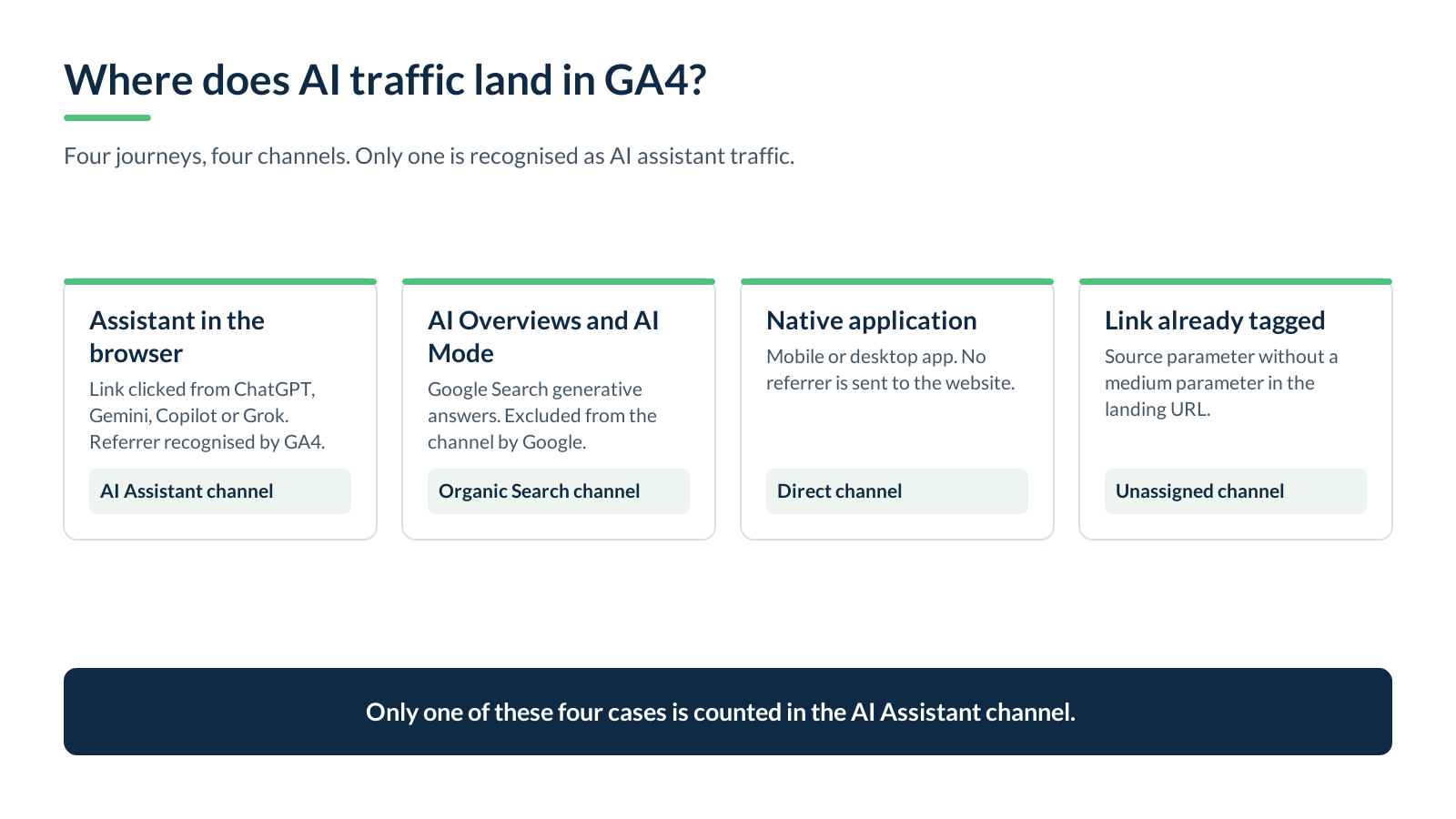
Here is the content of the diagram for this section, as a list, so the article stays complete without the image:
Third-party assistant, link clicked in a browser: referrer recognised, medium ai-assistant, channel AI Assistant. This is the measured case.
Google Search AI Overviews and AI Mode: excluded from the channel by Google, counted in Organic Search.
Native app, desktop client, referrer absent: no source information, channel Direct.
Link already carrying a source parameter but no medium: source populated, medium empty, channel Unassigned or unexpected.
How do you check in twenty minutes what your GA4 already does with AI traffic?
Before building anything, measure what exists. This sequence runs entirely in the interface, needs no developer, and gives you a numbers-based basis for discussion.
Open the traffic acquisition report and switch the primary dimension to Session default channel group. Note the AI Assistant share over the last ninety days, in sessions and in conversions.
Build a free-form exploration with Session source as rows and Session medium as columns. Filter the source on the assistant domains you want to follow. You will see immediately whether some of those sources arrive with an empty or odd medium: that is blind spot number three.
Look for the parameter in your landing pages. In the same exploration, put Landing page with query string in rows and filter on utm_source. You get the real list of parameters assistants are appending to your URLs, as of today.
Compare against Search Console, generative AI performance report. If impressions there are substantial while your AI Assistant channel is marginal, you have the proof of blind spot number one.
Look at the direct traffic curve over two years. A slow, unexplained rise in direct, with no offline campaign and no new brand awareness, is a classic sign of blind spot number two.
This check is also the starting point of a tracking audit: it says what your reports know, and above all what they do not know.
What benchmarks should you use in Search Console for AI visibility?
Since the AI Assistant channel ignores Google's generative surfaces, you have to look for that information where it does exist. Google added a generative AI performance report to Search Console, covering AI Overviews and AI Mode. Its documentation states that these insights were rolled out to all websites worldwide as of 31 August 2026.
Two limits to know before you build a dashboard on it:
The report is based on impressions, defined as how many times links to your site were shown to a user in a generative AI feature on Google Search. Do not ask it for click volume per surface.
AI Overviews and AI Mode are not separated from one another, and data from Search Labs experiments is excluded. The usual performance report limits apply, including the one thousand row table cap.
In practice, the sound use is comparative rather than absolute: follow the trend of your generative impressions, cross it with the evolution of your direct traffic and your unattributed conversions, and accept that no complete measurement chain currently exists between a generative answer and an order. That is uncomfortable, but it is the state of the art, and acknowledging it beats manufacturing a reassuring figure.
What does server-side tracking change in measuring AI traffic?
One point needs to be clear: server-side tracking does not recover a referrer the browser never sent. No architecture performs that miracle. What it brings is different, and more durable: persistence of the source information.
In a browser-only setup, visit source lives for the length of the session and dies with the cookie. In a well-built server-side setup, you capture source, medium, campaign and URL parameters on landing, store them in your own first-party context, and pass them to the systems that need them when they need them: your analytics, your advertising platforms, and above all your CRM.
That is what lets you answer the only question that really matters to an SME: does a lead from an AI assistant become a customer, and at what value? If the source dies at the first form, you will never know. If it is written on the prospect record, you will have it at signature, two months later, in your offline conversions.
Three implementation precautions, consistent with what we see on our own deployments:
Capture the source on the first page view, not at conversion. In between, the user has browsed, and the original referrer is gone.
Monitor consistency after every release. That is the subject of our article on why server-side breaks after launch: a change of CMP, theme or redirect is enough to empty a source field.
Check your domain transitions. If payment or booking happens on a third-party domain, the original source is lost exactly as in the scenarios described in our article on cross-domain tracking. A visitor arriving from an AI assistant and then passing through an external payment page can be counted twice, or not at all.
Also worth noting on the Google tooling side: a server-side event interface, the Data Manager API, was presented on 7 May 2026 as an alternative to Measurement Protocol. It does not change the logic above, but it is worth watching if your architecture sends server-to-server events.
How do you build AI traffic tracking that lasts?
The assistant list changes, URL parameters change, Google's channel groups change. Durable tracking therefore is not about freezing a domain list, but about putting four complementary layers in place. Here is the content of the diagram for this section, as a list:
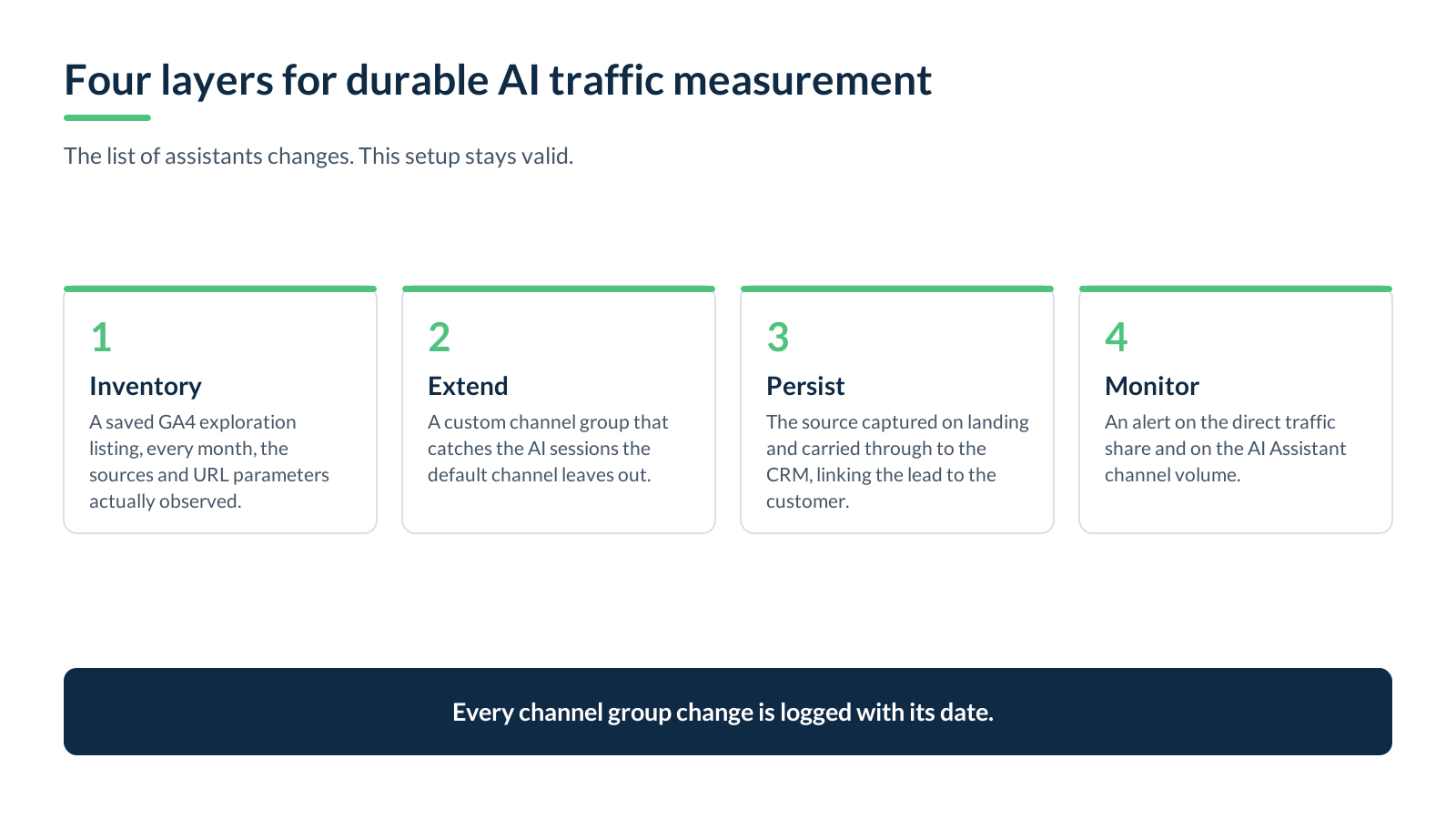
Inventory. A saved GA4 exploration that lists, every month, the sources and URL parameters actually observed. This is your change detector: the day an assistant alters its behaviour, this is where you will see it.
Extend the channel group. The default channel is enough to start with. As soon as your inventory shows AI sessions outside the channel, create a custom channel group that catches the cases automatic detection misses, and keep the default channel as a comparison baseline.
Persist the source. Landing capture and transmission to the CRM, as described above. This is the layer that turns a session statistic into commercial information.
Monitor. A simple alert on the direct traffic share and on AI Assistant channel volume. An abrupt drop is almost never a change in visitor behaviour, it is a technical change at your end or at a supplier's.
One final point of method: document the date of every channel group change in a log. Without it, six months from now, nobody will know whether the break in the curve is a market effect or a configuration effect. This is exactly the kind of thing an annual maintenance arrangement covers for a measurement setup.
Where each AI surface sits: a side-by-side comparison
A comparison of the main surfaces, from the point of view of what you can actually measure today:
Third-party assistants used in a browser (ChatGPT, Gemini, Copilot, Grok, Deepseek and other assistants recognised by Google). Measurement: GA4's AI Assistant channel. Granularity: session and conversion. Reliability: good, within the limits of Google's referrer list.
Native apps and desktop clients of those same assistants. Measurement: nothing direct, the traffic falls into Direct. Granularity: none. Reliability: nil. Partial workaround: analyse the direct trend and unusual landing pages.
Google Search AI Overviews and AI Mode. Measurement: Search Console's generative AI performance report for impressions, GA4's Organic Search channel for sessions, with no way to separate them from the rest of organic. Granularity: impressions by page, country, date and device. Reliability: fair as a trend, unusable for conversion attribution.
Citations in AI answers with no clickable link. Measurement: none, by construction. Granularity: none. Workaround: brand awareness tracking, branded search queries, and questions asked in sales conversations.
The useful reading of this comparison is not to hunt for the most flattering column, it is to stop comparing channels whose reliability is not of the same order.
And what about FADP and GDPR compliance?
Nothing specific to AI traffic alters the applicable regime, and that is good news. The rules you already apply to your measurement apply here unchanged.
Three reminders that head off the classic mistakes:
Visit source becomes personal data as soon as it is attached to an identifier, a cookie, a customer ID or an email address. At that point it belongs in your record of processing activities, like any other journey data.
Consent conditions the measurement, not the channel. If your setup only measures after consent, your AI Assistant channel is understated in the same proportion as everything else. Say so in your reports, otherwise comparing it with advertising platform figures makes no sense.
URL parameters added by a third party exempt you from nothing. A source parameter in a URL is not a legal basis. If you store it durably alongside an identifier, it follows the same regime as the rest.
For the substantive difference between the two regimes and what it means for a Swiss setup, our FADP versus GDPR guide covers the ground. And if your question is about configuring consent in Google tools, our article on Google Consent Mode v2 deals with the concrete effects on audiences and conversions.
How A-Track can help
We are a Geneva-based firm specialising in measurement and compliance, and we work on three levels on this particular subject.
A tracking audit establishes what your reports currently measure of AI traffic, where your blind spots are, and how much volume they represent. A server-side deployment puts source capture and persistence through to your CRM in place, so the question of whether a channel pays can finally be settled. An annual maintenance arrangement keeps the setup aligned when Google changes its channel groups, which happened twice in 2026.
We work with Swiss SMEs, web agencies and marketing agencies, in French, English and German.
Next step
Do not start with a technical project. Start with the twenty-minute check described above: your AI Assistant channel share, the real list of URL parameters you receive, and the trend of your generative impressions in Search Console. Those three figures are enough to know whether the subject deserves investment at your organisation, or remains marginal for now.
If what you find worries you, or if the figures do not reconcile, our flash audit is the quickest entry point to a documented answer.
Sources
Google Analytics, default channel groups: definition of the AI Assistant channel, exclusion of AI Overviews and AI Mode, membership conditions.
What's new in Google Analytics: the AI Assistant channel announcement of 13 May 2026, the Source Group dimension of 11 June 2026, the Data Manager API of 7 May 2026.
Google Analytics, traffic sources: processing of direct traffic when no referral information is available, precedence of campaign fields over the referrer.
Search Console, generative AI performance report: AI Overviews and AI Mode scope, impression-based measurement, worldwide rollout as of 31 August 2026, known limits.