
Table of content
Your LinkedIn Ads campaigns drive leads into your CRM, yet Campaign Manager shows half as many? The problem rarely lies with the audience or the message: it lies with measurement. Without reliable tracking, LinkedIn cannot tell which campaigns generate your enquiries, and its algorithm optimises blind.
In short
LinkedIn tracking relies on two building blocks: the Insight Tag in the browser and the Conversions API on the server.
LinkedIn recommends using both together, with a shared eventId so the same conversion is not counted twice.
Google Tag Manager simplifies installation, on the web and server side.
The visitor's consent applies to both flows: LinkedIn is not covered by Google's Consent Mode.
What LinkedIn Ads tracking measures
LinkedIn Ads tracking attributes actions taken on your site to your campaigns:
a contact or demo form submitted;
a visit to a key page (pricing, job openings);
a white paper download;
a newsletter or webinar sign-up;
a B2B or B2C purchase.
It relies on two complementary technologies: the Insight Tag, a script running in the browser (client-side tracking), and the Conversions API, which sends events from a server. Together they feed attribution, retargeting audiences and campaign learning.
The Insight Tag: installing it with Google Tag Manager
The Insight Tag is LinkedIn's equivalent of the Meta Pixel. It collects page views, detects conversions, builds retargeting audiences and feeds optimisation models.
Install the Insight Tag in four steps
Get the partner ID: in Campaign Manager, in the ad account's Insight Tag section.
Create the tag in GTM: new "LinkedIn InsightTag 2.0" tag (gallery template), paste the partner ID.
Choose the trigger: all pages, but only after the visitor's marketing consent (through your CMP).
Test, then publish: check in GTM preview that the tag does not fire before the visitor's choice.
Its limits
blocked by some ad blockers;
JavaScript cookies capped at 7 days by Safari (ITP), or 24 hours after an ad click;
no data at all if the visitor refuses marketing cookies.
It is the simplest method, but not the most complete.
Setting up your LinkedIn conversions
In Campaign Manager, under Conversions, each conversion is defined by:
a clear name (for example "Contact form: lead");
a category (lead, purchase, sign-up);
a value, if it makes sense for you;
a post-click and post-view conversion window, and an attribution model from those LinkedIn offers;
a tracking method: URL load or event.
URL or event?
The URL method suits a dedicated thank-you page. For a form without a redirect, a button click or a dynamic action, use the event method: in GTM, a LinkedIn conversion tag with the partner ID and conversion ID, fired on the desired action (form submit, click, custom dataLayer event). That is the basis of clean, granular tracking.
The LinkedIn Conversions API on the server
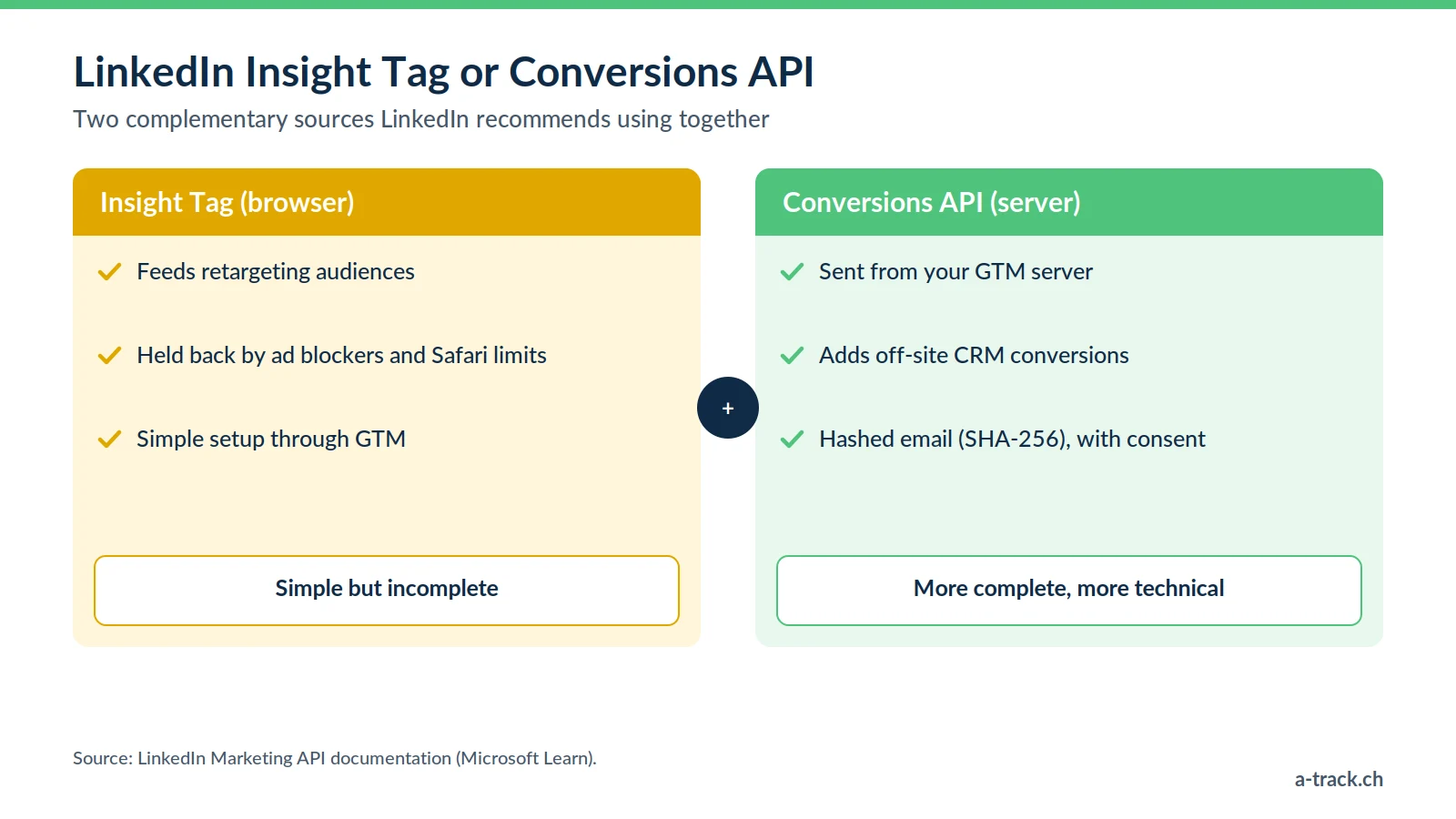
With server-side tracking, events travel from your infrastructure to LinkedIn rather than from the browser.
Benefits and constraints
More resilient: less exposed to ad blockers and browser restrictions, since sending does not depend on a third-party script.
More complete: you can send conversions that happen off-site, such as a qualified lead in your CRM.
More controlled: you choose what data is sent. Identifiers such as email are sent hashed (SHA-256), after consent.
Constraint: a more technical setup, with a server-side GTM container and hosting costs.
Integration with server-side GTM
Prerequisites: Insight Tag installed, server GTM container running, Conversions API access token generated in Campaign Manager.
Create a conversion rule dedicated to the server source in Campaign Manager.
Add a LinkedIn CAPI tag template (community gallery) to the server container, with the token, conversion ID and eventId.
Fire it on the same event as in the browser, then publish.
For a detailed B2B-focused guide, read our article on the LinkedIn CAPI.
Deduplication: the role of the eventId
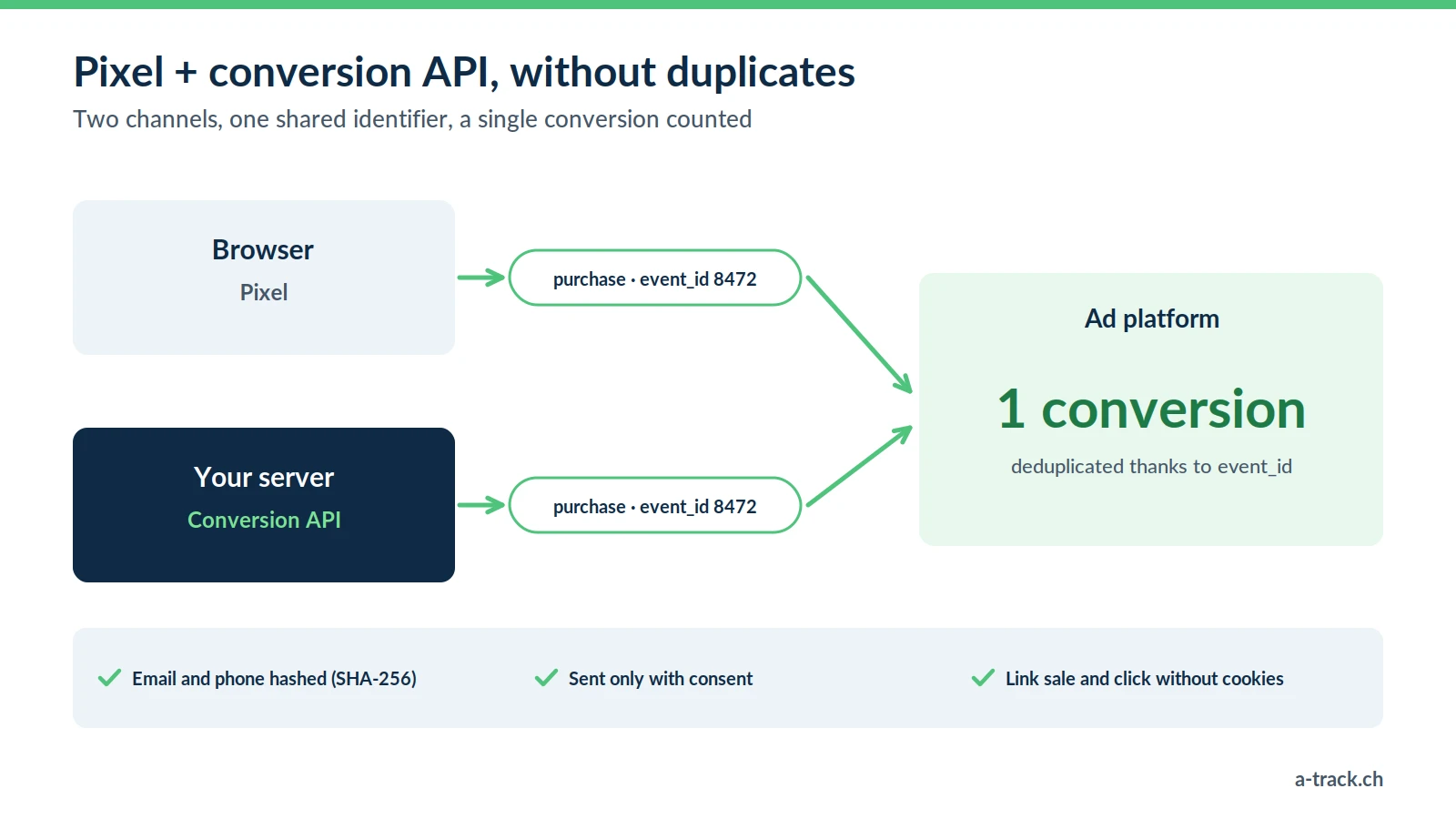
If you enable both methods, the same conversion reaches LinkedIn twice. According to LinkedIn's documentation, when an Insight Tag event and a Conversions API event share the same eventId, LinkedIn discards the API event and counts only the Insight Tag one.
Generate a unique ID in the browser for each conversion (a GTM gallery variable template does this).
Pass it to the Insight Tag (event_id parameter) and to the server (eventId).
Check in Campaign Manager that conversions are not doubled.
A-Track tip
After go-live, compare the leads counted by LinkedIn with those in your CRM for two weeks. A LinkedIn total that suddenly doubles almost always points to an eventId that does not match between browser and server.
Why combine browser and server, while respecting consent
LinkedIn recommends sending events through both the Insight Tag and the Conversions API, for more reliability and a fuller view of the customer journey:
the Insight Tag feeds retargeting audiences;
the Conversions API makes measurement reliable and adds CRM conversions;
the eventId prevents duplicates;
LinkedIn's algorithm receives a cleaner signal and optimises better.
On compliance, remember that LinkedIn does not read Google's Consent Mode: your CMP must block both the Insight Tag and the server flow when the visitor refuses. In Switzerland, Art. 45c of the Telecommunications Act requires information and a right to refuse; for your European visitors, prior consent applies (ePrivacy and GDPR). Under the FADP, document this transfer to LinkedIn in your privacy policy. A refusal stays a refusal, in the browser and on the server.
Conclusion: three actions to make LinkedIn Ads reliable
Make the Insight Tag conditional on consent and move your key conversions to the event method.
Add the Conversions API through server-side GTM, with a shared eventId.
Reconcile LinkedIn leads with your CRM every month. To go further, see our marketing performance measurement guide.
Are LinkedIn Ads leads missing from Campaign Manager?
A-Track sets up the Insight Tag behind consent, adds the Conversions API through server-side GTM and configures eventId deduplication.
First step: a 30-minute call with an expert to review your campaigns.