
Table of content
On LinkedIn, a B2B click is expensive, and a single quote request can be worth a whole contract. Yet many agencies steer these budgets with an incomplete dashboard: the LinkedIn Insight Tag faces the same limits as Meta's Pixel. LinkedIn only sees part of the leads, and the algorithm learns from too little data.
In short
The LinkedIn Conversions API (CAPI) sends conversions from your server or CRM, alongside the Insight Tag.
The li_fat_id click parameter and a SHA-256 hashed email help LinkedIn recognise the lead.
A shared eventId prevents the same conversion from being counted twice.
The real B2B win: sending qualified leads and signed contracts back from the CRM.
What is the LinkedIn Conversions API?
As with Meta, the LinkedIn CAPI sends conversions from a server to LinkedIn, for example through server-side Google Tag Manager, instead of relying solely on the browser script. According to LinkedIn's documentation, it streams conversion events to LinkedIn regardless of where the conversion occurs: website, CRM or point of sale.
For e-commerce, see our Facebook CAPI guide: same principle, different stakes.
Why it matters so much in B2B
In B2B, conversion volume is low but each lead can be worth a lot. Losing a handful of quote requests is enough to skew the algorithm's learning.
1. Keep the signal over long cycles
Firefox blocks LinkedIn's common trackers on third-party sites by default (Mozilla Help). Safari, with ITP, caps cookies set by JavaScript at 7 days.
The problem: the decision-maker clicks on Monday, comes back ten days later and fills in the form. If the cookie has expired in the meantime, LinkedIn can no longer tie the conversion to the campaign.
The answer: with server-side tracking, the li_fat_id click ID can be stored in a first-party cookie set by your own server, which is not subject to the JavaScript cookie cap. The condition: the server must share the website's IP address, otherwise Safari applies the 7-day cap too (WebKit, 2023).
2. Optimise for quality, not quantity
The Insight Tag sees "a form was submitted". It cannot tell a qualified prospect from spam. On the server, you can filter or qualify events before sending them, and feed the algorithm with the leads that matter.
Technical implementation
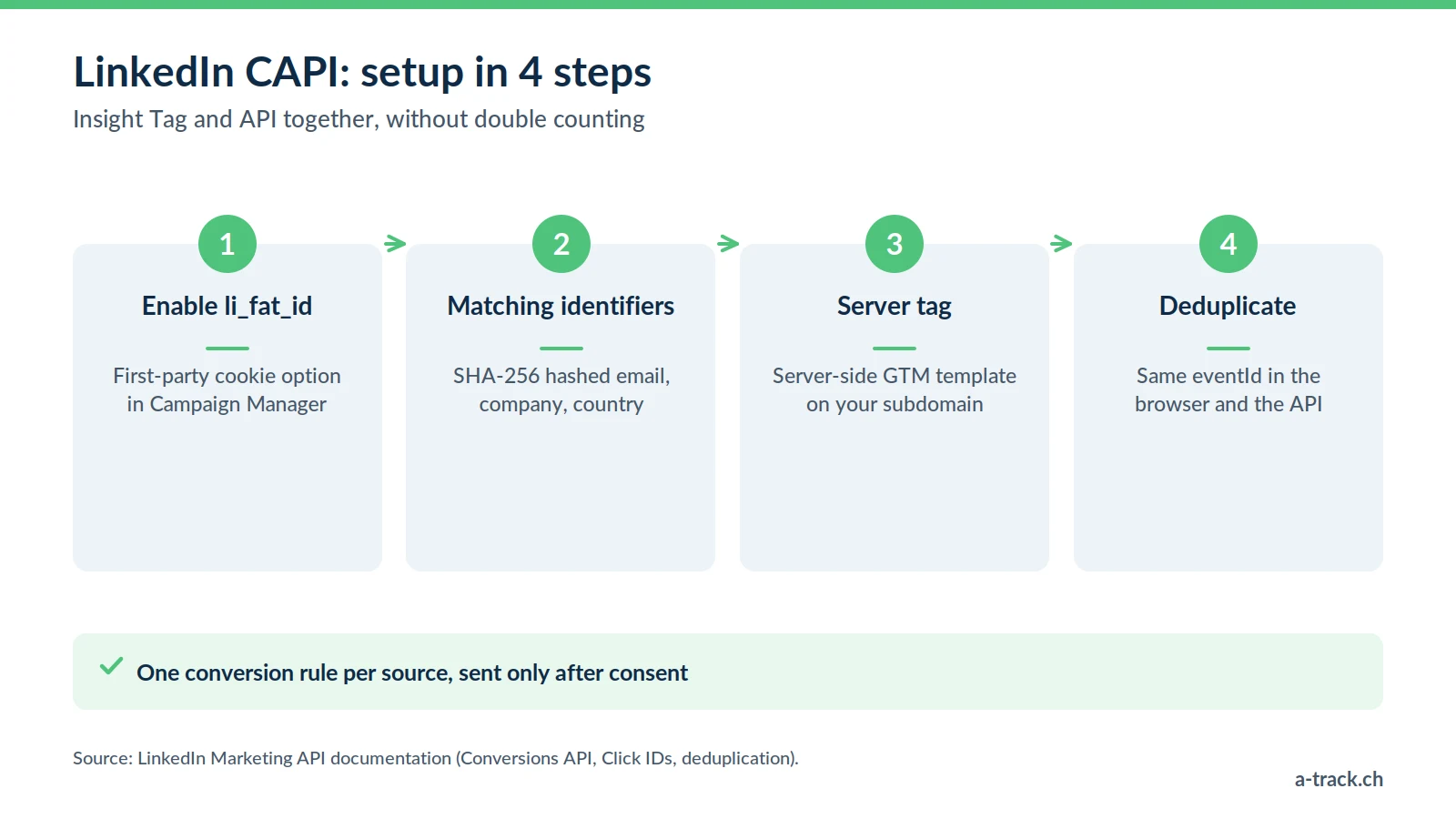
Enable the click ID. In Campaign Manager, the first-party cookie option appends li_fat_id to your ad URLs (LinkedIn, Click IDs). Your server captures and keeps it.
Send matching identifiers. SHA-256 hashed email, name, company, country: LinkedIn recommends sending several to raise match rates. Hashing is not encryption: this is still personal data under the FADP.
Configure the server tag. A server-side GTM template, such as the one from Stape, handles authentication with the LinkedIn API without custom development.
Deduplicate. Generate an eventId in the browser and pass it to both the Insight Tag and the API. According to LinkedIn's documentation, you create one conversion rule per source; for duplicates, LinkedIn keeps the Insight Tag event and discards the API one (deduplication).
CRM conversions: measuring what really counts
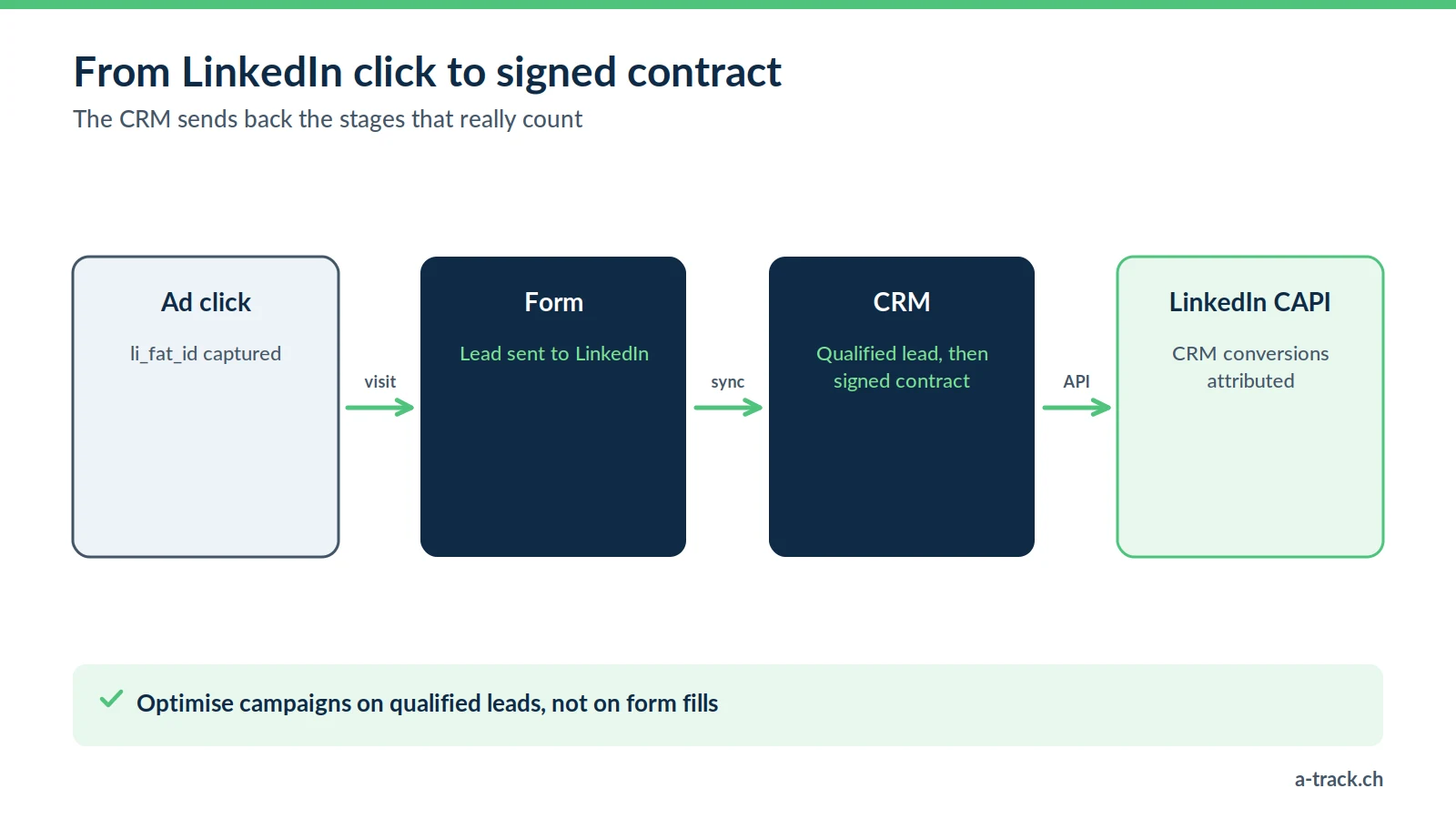
The CAPI can also report events that happen in the CRM (Salesforce, HubSpot, Pipedrive), not on the website: these are offline conversions.
Scenario: a prospect fills in a form. Three weeks and two meetings later, they sign.
With the CAPI: the CRM sends the "qualified lead" and then "contract signed" stages back to LinkedIn, with the same matching identifier.
The benefit: you finally see what each campaign brings in contracts, not just forms, and you can optimise for qualified leads.
The same logic applies to Google Ads: read our CRM offline conversions guide.
Consent: a refusal is still a refusal
LinkedIn does not read Google Consent Mode: it is up to you to make both the Insight Tag and the server call depend on the visitor's choice, for example through Cookie-Script. In the EU, prior consent is required; in Switzerland, Art. 45c of the Telecommunications Act requires information and a right to refuse. For CRM conversions, inform prospects in your privacy policy. The full framework is in our FADP and GDPR compliance guide.
A-Track tip
After go-live, compare the conversions of each rule (Insight Tag and API) with CRM leads for two weeks. A total that doubles points to a missing eventId; a total that does not move points to a consent filter or a li_fat_id lost along the way.
Conclusion: three actions for your B2B campaigns
Enable li_fat_id in Campaign Manager and check it survives until the form.
Add the CAPI with a shared eventId and one conversion rule per source.
Connect at least one CRM stage (qualified lead) to optimise for quality.
What if LinkedIn optimised for signed contracts?
A-Track connects your CRM to LinkedIn: li_fat_id capture, Conversions API with eventId, and qualified leads and contracts sent back, subject to consent.
Let's talk in a 30-minute call with an expert.