
Table of content
If you manage ad budgets for your clients, you know the gap: the back office counts more sales than Google Ads, Meta claims others, and no one knows who is right anymore. It is not a bug, it is the limit of tracking that relies on the browser alone. Server-side tracking addresses this problem, provided it is deployed properly.
In short
Server-side routes data through a server you control, on a subdomain of the site, before sending it to the platforms.
It makes measurement more resilient to browser restrictions and puts you in charge of every piece of data sent.
Key use cases: Meta CAPI, GA4, Google Ads, TikTok, LinkedIn, offline conversions.
It replaces neither the CMP nor consent: a refusal stays a refusal.
What is server-side tracking? (definition)
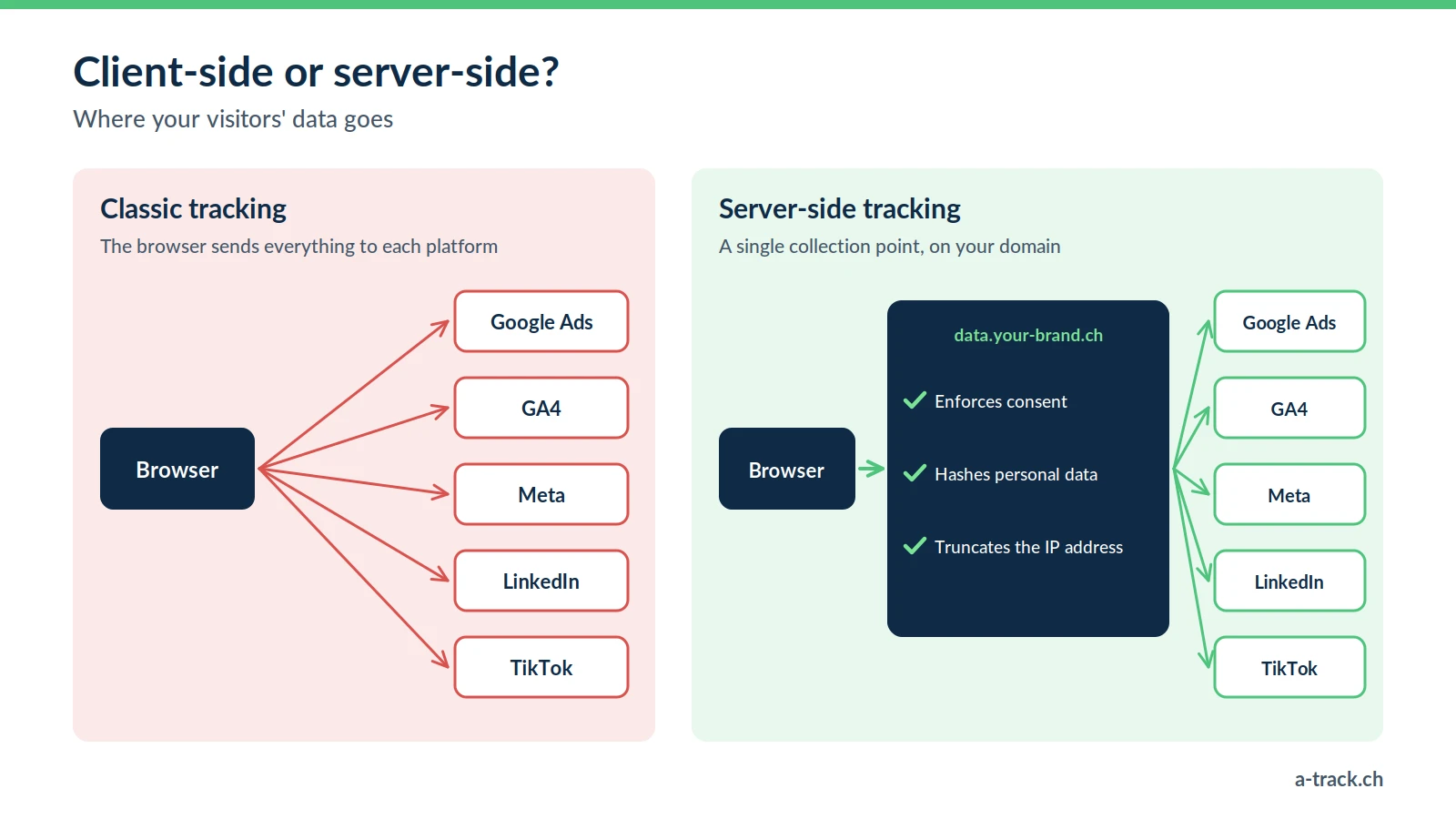
Server-side tracking is a data collection method that moves processing from the user's browser (the "client") to a server you control. Instead of going straight from the browser to Google, Meta or TikTok, the data passes through an intermediate step: your own tagging server.
1. Client-side tracking (the "pixel" method)
This is the legacy method. The browser (Chrome, Safari) loads one script per tool (the GA4 tag, the Meta pixel, the LinkedIn Insight Tag) and sends data directly to each platform. That flow is increasingly held back:
Ad blockers: according to GWI (Q2 2025), 30.9% of Swiss internet users run one.
Safari's ITP: cookies set by JavaScript are capped at 7 days (24 hours in some link-tracking cases).
Consent: without valid signals, Google has made less use of Swiss visitors' data since 31 July 2024.
The result: some conversions never reach the platforms, and Smart Bidding optimises on an incomplete picture.
2. Server-side tracking
Here, the browser sends data to an intermediate server hosted on a subdomain of your client's site (for example data.yourclient.ch). This server, usually a server-side Google Tag Manager (sGTM) container, filters and cleans the data, then forwards it to the platforms through their APIs. Requests stay on the site's domain, and you decide exactly which data goes to which platform. A detailed comparison is in our article server-side vs client-side.
The concrete benefits (and their limits)
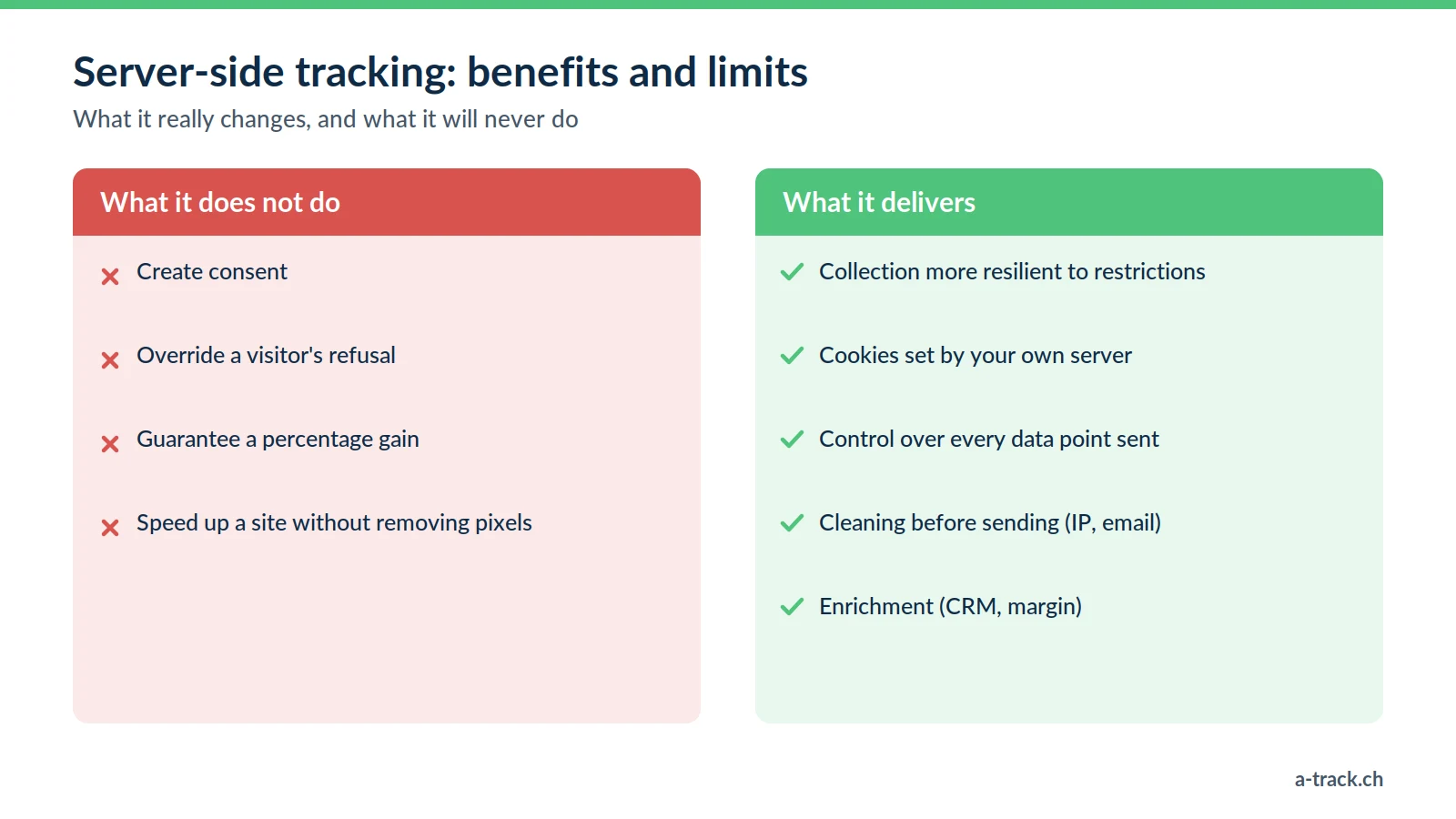
Beyond the technology, here is what server-side changes for your campaigns:
More reliable collection. First-party measurement stands up better to the technical restrictions of browsers and blockers, so your ad algorithms get a more complete signal. Based on our measurements across more than 100 installations (Stape Analytics), server-side tracking recovers 30 to 80% more data depending on the site, around 40% on average. The gain also depends on the audience: measure it before and after.
Longer-lasting first-party cookies. A cookie set by your server escapes the 7-day cap on JavaScript cookies. Chrome still caps any lifetime at 400 days (Chrome, 2022), and Safari reapplies 7 days if the measurement server is seen as third-party (WebKit, 2020): hosting has to be designed accordingly.
Control over data. Each platform only receives what you configured. No more free-for-all collection by third-party scripts on the client's site.
Enrichment. The server can complete an event (order value, CRM status, margin) before sending it.
A potentially faster site. Fewer third-party scripts in the browser improve Core Web Vitals, provided you actually remove client-side pixels.
Data protection by design. Truncating an IP or hashing an email before sending data to US servers is a concrete application of Art. 7 FADP and Art. 25 GDPR.
The limit to keep in mind: server-side does not create consent. It applies the choices passed on by the CMP, nothing more.
The most common use cases
Server-side answers very concrete needs:
Meta Conversions API (CAPI): sending events from your server to Meta, alongside the pixel, with deduplication.
GA4 server-side: cookies set by your server and data cleaned before it reaches Google.
Google Ads server-side: conversion tags and enhanced conversions handled from the server.
TikTok Events API: useful for a highly mobile audience, where the in-app browser makes classic tracking harder.
LinkedIn CAPI: reliable tracking of high-value B2B leads.
Offline and CRM conversions: tying sales closed by phone, in store or in the CRM back to campaigns.
Why server-side Google Tag Manager (sGTM)
Several tools can do server-side. Our default choice remains the server-side Google Tag Manager container:
No licence cost: you only pay for server hosting.
Version control: every change is traceable and reversible.
Teamwork and a mature template ecosystem.
For hosting, we favour Stape (EU servers), easier to maintain than a hand-managed Google Cloud instance. Stape also offers the Custom Loader, which serves the GTM script from the site's own domain: more robust first-party loading that still lets the CMP decide what fires. Google offers a similar approach for its own tags, the Google tag gateway, deployable through a CDN or a server.
Understanding tracking as a 3-layer system
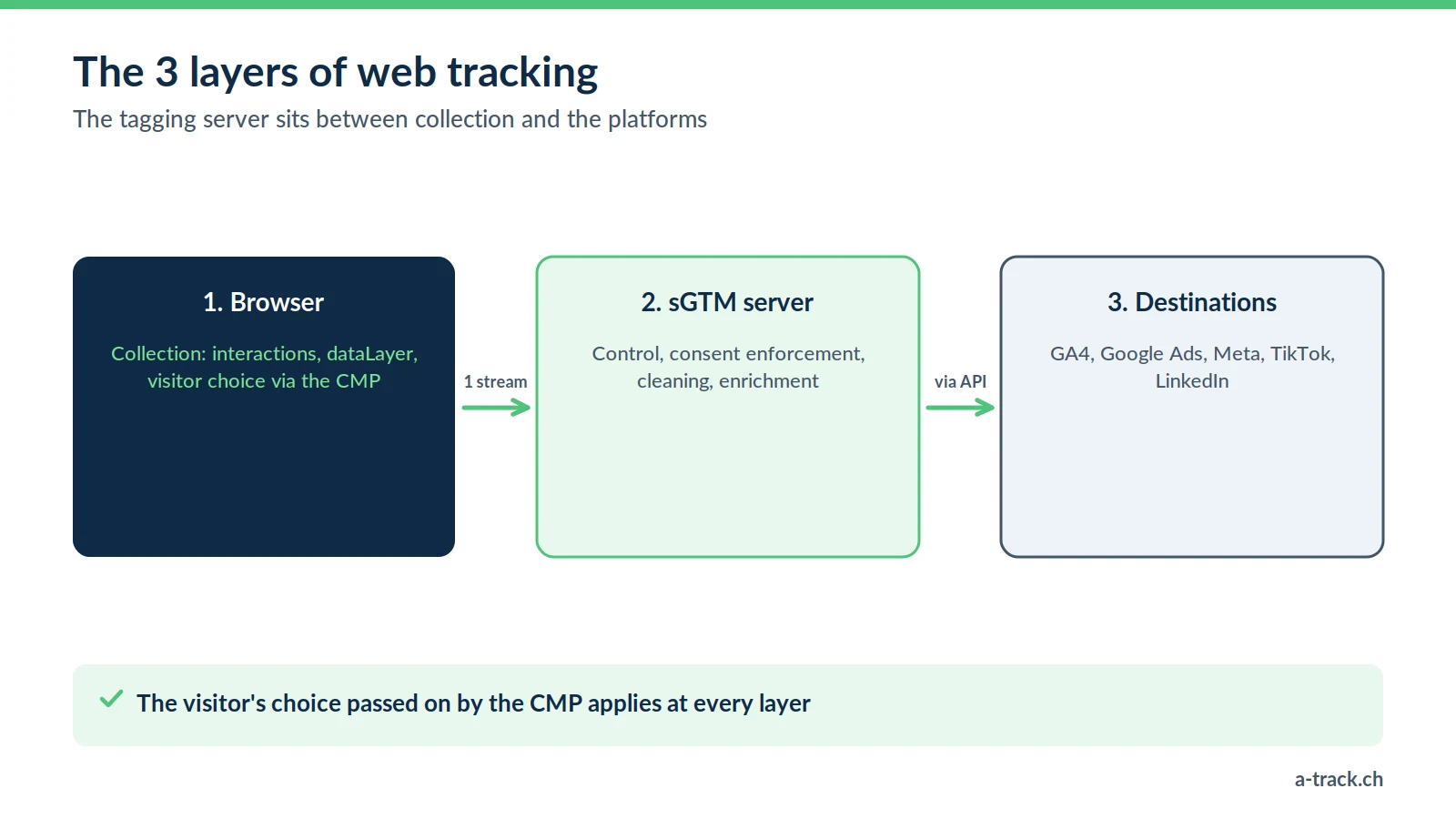
The clearest way to picture modern tracking: three layers that complement each other.
Layer 1, the browser: collection (interactions, dataLayer, consent through the CMP).
Layer 2, the tagging server (sGTM): control, consent enforcement, cleaning and enrichment.
Layer 3, the destinations: GA4, Google Ads, Meta, TikTok, LinkedIn.
Client-side and server-side do not compete: they work together. The server layer is the one that gives you back control, reliability and traceability. It is also the simplest diagram for presenting the project to a non-technical client.
The A-Track method: server-side and compliant
Turning on server-side without thinking about compliance just moves the problem. Our approach combines performance and legal certainty:
EU hosting to limit transfers outside Europe; the final sends to Google or Meta in the United States are still documented.
First-party subdomain, set up for durable cookies and reliable measurement.
Data cleaning (IPs, emails, URL parameters) before anything is sent.
Hybrid setup pixel plus conversion API, with deduplication.
CMP and Consent Mode v2 configured properly: a refusal must stay a refusal, in the browser and on the server.
A-Track tip
Server-side is not only for large accounts. To decide, compare one month of back-office sales with the conversions reported in Google Ads and Meta: if the gap affects your bidding decisions, the question is no longer "should we switch?" but "where do we start?".
Conclusion: where to start
Check the CMP and Consent Mode v2: the server will apply those choices, it will not fix them.
Pick one high-stakes first use case (Meta CAPI or Google Ads) rather than migrating everything at once.
Monitor the setup over time: server-side tracking can break after go-live.
To go further: our complete guide to server-side in Switzerland and our guide to marketing performance measurement.
Is server-side the right move for your clients?
A-Track assesses the gap between back office and platforms, checks your CMP and Consent Mode v2, then recommends the first use case to migrate, such as Meta CAPI or Google Ads.
Start with a 30-minute call with an expert.